Video Commerce appearance: logo and brand
Where in the dashboard: Video Commerce › Aparência
The Marca (Brand) area of Video Commerce › Aparência puts your store’s identity in the player: the logo, the brand name and the font. It also brings the color and logo from the Provador in one click and controls the “Tecnologia por Provei.AI” (Powered by Provei.AI) badge.
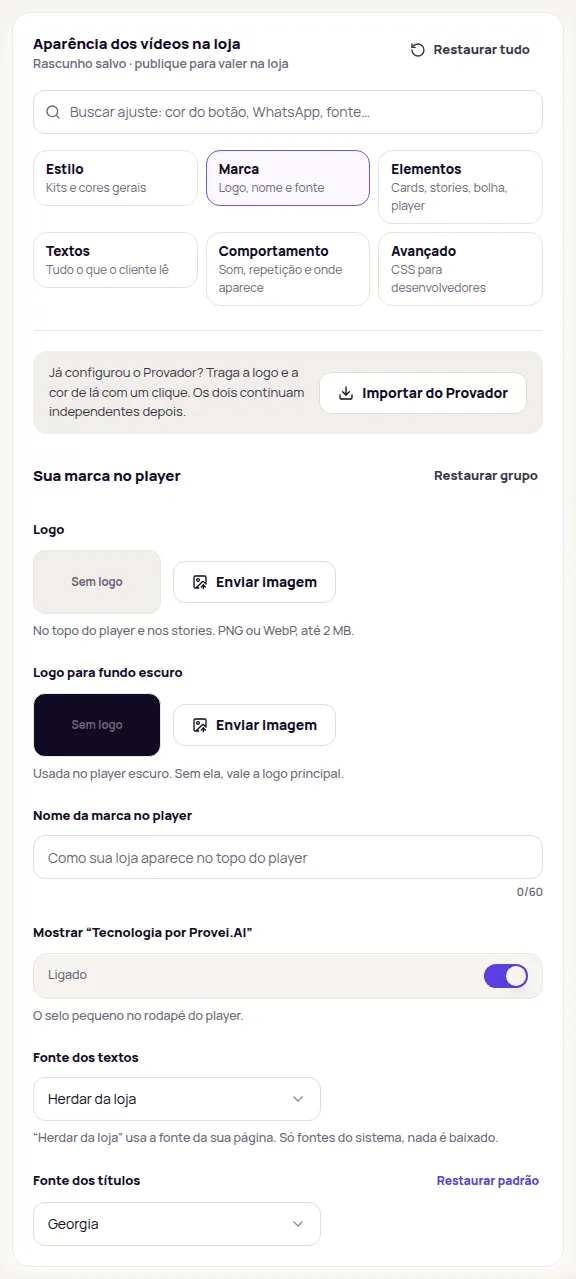
Upload your logo
Section titled “Upload your logo”| Field | Where it shows |
|---|---|
| Logo | At the top of the player and in the stories. |
| Logo para fundo escuro (Logo for dark backgrounds) | In the dark player. Without it, the main logo is used. |
-
In Aparência › Marca, in the Logo field, click Enviar imagem (Upload image).
-
Choose a PNG or WebP file up to 2 MB. SVG logos aren’t accepted: export to PNG first.
-
The logo shows in the frame next to the button and in the preview. To change it, click Trocar imagem (Change image). To take it out, click Remover (Remove).
-
If your store’s player is dark and your logo is dark, also upload a light version in Logo para fundo escuro.
A logo with a transparent background works best on both the light and the dark player.
Brand name in the player
Section titled “Brand name in the player”In Nome da marca no player (Brand name in the player), write how your store shows at the top of the player, up to 60 characters. Leave it empty to show no name.
- Fonte dos textos (Text font) and Fonte dos títulos (Heading font): Herdar da loja (Inherit from the store) uses your page’s font. The other options are system fonts, such as Arial, Georgia or Verdana. Nothing is downloaded, so your store doesn’t get slower.
The “Tecnologia por Provei.AI” badge
Section titled “The “Tecnologia por Provei.AI” badge”The player shows a small badge in its footer, “Tecnologia por Provei.AI”. To remove it, switch off Mostrar “Tecnologia por Provei.AI” (Show “Tecnologia por Provei.AI”) and publish. The badge text doesn’t change; it only goes away as a whole.
Import from the Provador
Section titled “Import from the Provador”If you already set up the Provador (try-on), click Importar do Provador (Import from the Provador) at the top of Marca (or on the Logo e cores step of the Deixe com a cara da sua loja guide). Provei copies the accent color and, on the Enterprise plan, the try-on logo into the appearance draft.
A notice says what was imported, for example Importamos a cor de destaque e a logo do Provador (We imported the accent color and the logo from the Provador). If the try-on has no logo or color yet, the notice says so and nothing changes. The import happens once: after that, the try-on and Video Commerce stay independent, and changing one doesn’t change the other.
Like every appearance setting, what you imported only reaches your store after Publicar (Publish).
What is in the Enterprise plan
Section titled “What is in the Enterprise plan”These settings are part of the Enterprise plan:
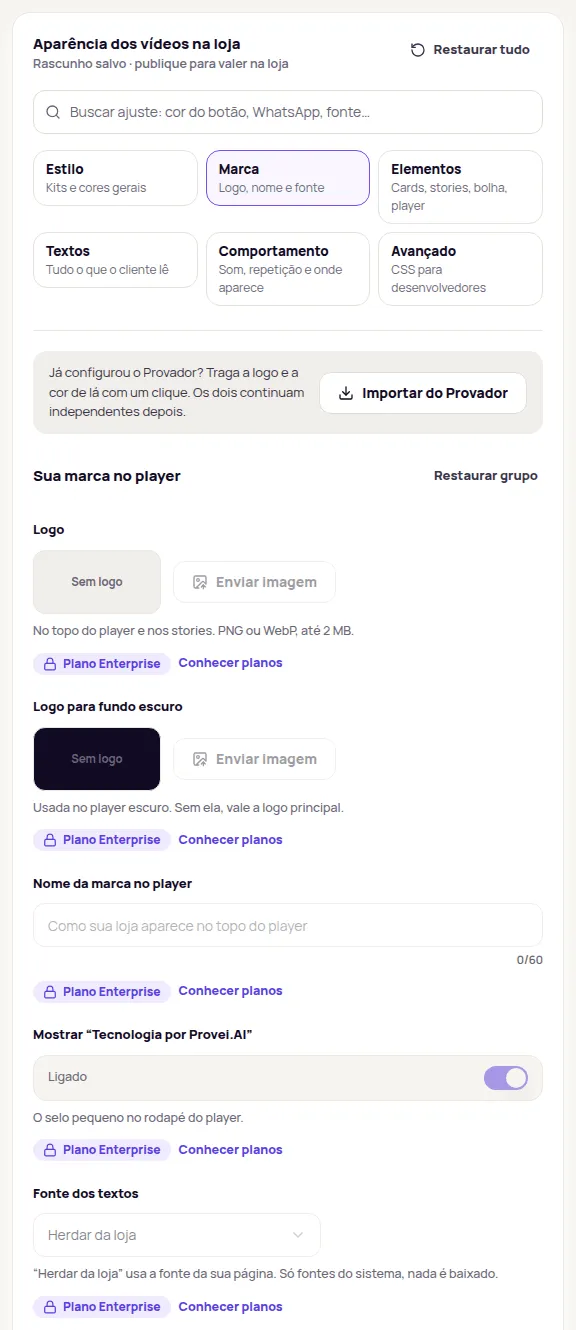
- Logo and Logo para fundo escuro;
- Nome da marca no player;
- Fonte dos textos and Fonte dos títulos;
- removing the “Tecnologia por Provei.AI” badge and changing its color;
- theme, player and showcase CSS. See Advanced CSS.
On other plans, these fields show with the Plano Enterprise badge and the Conhecer planos (See plans) link, and you can’t change them. Colors, kits, elements, texts and behavior work on every plan that has Video Commerce.
If your store leaves Enterprise
Section titled “If your store leaves Enterprise”If your store leaves the Enterprise plan, the logo, brand name, fonts and CSS stop showing in your store, and the “Tecnologia por Provei.AI” badge comes back. This happens on its own, without publishing. The settings aren’t deleted: they stay saved in the dashboard. If your store goes back to Enterprise, check the appearance and publish again.
Frequently asked questions
Can I upload my logo as SVG?
No. Upload the logo as PNG or WebP, up to 2 MB.
Does Importar do Provador link Video Commerce to the try-on?
No. The import copies the accent color and the logo once. After that, the two stay independent.
What happens to my logo if my store leaves the Enterprise plan?
It stops showing in your store, together with the brand name, fonts and CSS, and the Tecnologia por Provei.AI badge comes back. The settings stay saved in the dashboard.