Products in Provei
The catalog is the list of products Provei recognizes in your store. The try-on and the size features only appear on the pages of products that are in this catalog and active.
What each product needs
Section titled “What each product needs”- Nome (Name) and Descrição (Description). The description helps produce a more accurate try-on.
- Link do produto na loja (Product link in the store): the address of that product’s page (not the home page). Provei uses it to know which page gets the try-on button.
- Fotos (Photos): at least one. The try-on uses the first photo. See Product photo requirements.
- Preço (Price): optional.
- For clothing, a linked tabela de medidas (size chart), if you use the size features. See Measurements and sizes.
Where to find it in the dashboard
Section titled “Where to find it in the dashboard”The Produtos (Products) menu has three screens:
- Produtos › Catálogo (Products › Catalog): list, search, filters, activation and deletion. See Manage the catalog.
- Produtos › Adicionar produtos (Products › Add products): add one product or many at once.
- Produtos › Tabelas de medidas (Products › Size charts): appears when your store has the measurement features. See Size charts.
Ways to add products
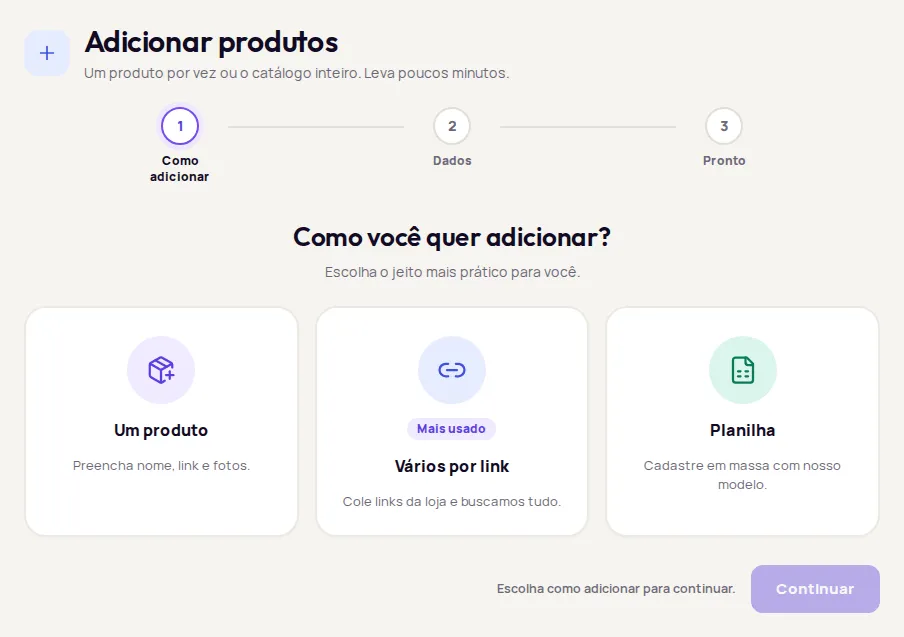
Section titled “Ways to add products”In Produtos › Adicionar produtos, pick the product line (if your store has more than one), then answer Como você quer adicionar? (How do you want to add?).
Fill in Nome, Link do produto na loja, Descrição and Preço (opcional) (Price, optional), and upload the Fotos. For clothing, you can also enter Medidas (opcional) (Measurements, optional). For eyewear, the Especificações da armação (Frame specifications) are optional. Click Cadastrar produto (Add product).
This option doesn’t need an access key.
Paste the product page links, one per line. Provei pulls the name, price and photos from each page. See Add products by link.
Upload a CSV or Excel file with a column of links. See Add products with a spreadsheet.
After adding a product, use Testar no provador (Test in the try-on) to see it the way your customer does.
In this section
Section titled “In this section”- Manage the catalog
- Add products by link
- Add products with a spreadsheet
- Product photo requirements
- Turn products on and off in the try-on
- Delete products
Frequently asked questions
Do I need to add every product in my store?
No. Add only the products where you want to offer the try-on or the size features. The button shows up only on the pages of products that are in the Provei catalog and active.
Why do I only see some product lines?
The dashboard shows only the lines enabled for your store, such as Roupas (Clothing), Móveis (Furniture), Pisos (Flooring), Revestimentos (Wall coverings) or Óculos (Eyewear). To enable another line, contact support.