Account, plan and integrations
The Conta (Account) area of the dashboard brings together your plan and credits, the people with access, integrations with other tools, API keys and help. The menu shows only the sections your account and your role can open.
Guides in this section
Section titled “Guides in this section”- Plan and credits: your current plan, balance, how long your credits should last and credit usage. Only the account owner sees it.
- Team: invite people, reset passwords and remove access. Only the account owner sees it.
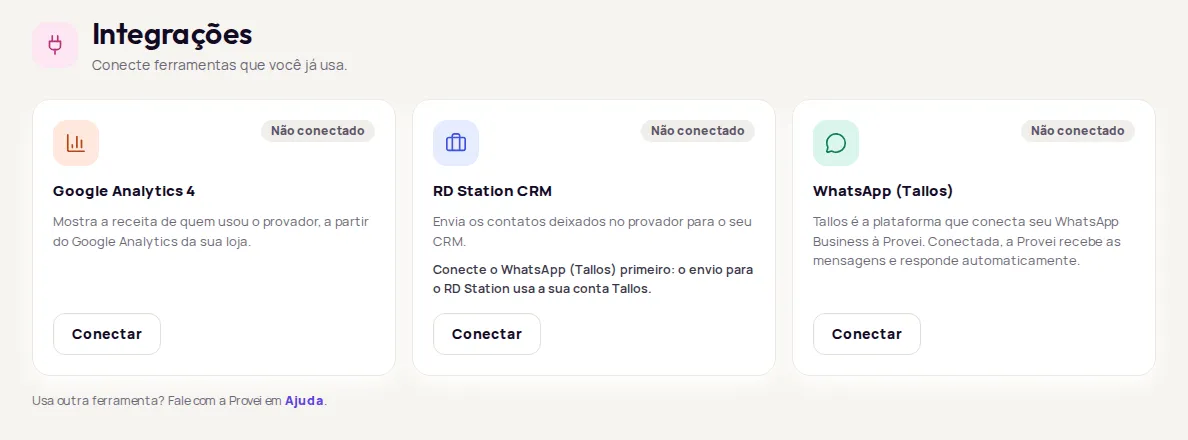
- Connect RD Station CRM: send contacts left in the try-on to your CRM.
- Connect WhatsApp (Tallos): link your store’s WhatsApp Business to Provei through Tallos.
- Connect Google Analytics 4: see revenue from customers who used the try-on in Resultados › Receita (Results › Revenue).
- API keys: create and revoke the keys that connect your store’s system to Provei.
What’s in each section
Section titled “What’s in each section”| Section | What it is for | Who sees it |
|---|---|---|
| Plano e créditos (Plan and credits) | Your plan, balance and credit usage. | Account owner |
| Equipe (Team) | Who has access to the store’s dashboard. | Account owner |
| Integrações (Integrations) | Connect tools you already use. | Owner and team |
| Desenvolvedor (Developer) | API keys for your own integrations. | Accounts with developer access |
| Ajuda (Help) | Talk to us or find answers. | Everyone |
Don’t see Desenvolvedor in the menu? This feature is turned on by Provei. Contact support to turn it on.
Help inside the dashboard
Section titled “Help inside the dashboard”In Conta › Ajuda (Account › Help) you’ll find:
- Falar no WhatsApp (Chat on WhatsApp): opens a conversation with Provei.
- Central de ajuda (Help center): installation and customization guides, and the API reference.
- Perguntas frequentes (FAQ): quick answers, such as what to do if the button doesn’t show and how to delete a customer’s data.
Use another tool that isn’t in Integrações? Contact Provei at suporte@provei.ai or on WhatsApp at +55 11 5296-0168.