Access rules and contact capture
In Acesso e contatos (Access and contacts) you decide what shoppers have to do before trying on and what your store gets from each person. You can also add questions about your niche.
To open it, go to Experiência na loja › Regras (In-store experience › Rules). The Acesso e contatos section is at the top.
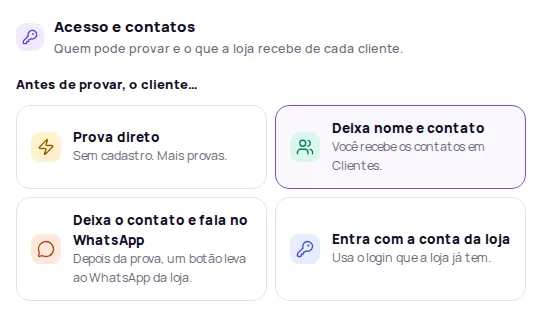
Choose how shoppers get into the try-on
Section titled “Choose how shoppers get into the try-on”In Antes de provar, o cliente… (Before trying on, the shopper…), pick one option:
No sign-up. This option gets the most try-ons, but your store doesn’t receive the contact details of the people who tried on.
Before trying on, shoppers enter the details you ask for. You receive the contacts in Customers.
-
Choose Deixa nome e contato (Leave name and contact).
-
Turn on the fields you want to ask for: Pedir nome (Ask for name), Pedir e-mail (Ask for email) and Pedir telefone (Ask for phone). Ask for at least email or phone.
-
Click Publicar alterações (Publish changes).
The name is always optional for the shopper. Email is required if the phone is left blank, and the phone is required if the email is left blank.
Shoppers leave their details before trying on and, after the try-on, a button takes them to your store’s WhatsApp.
-
Choose Deixa o contato e fala no WhatsApp (Leave contact and chat on WhatsApp). With this option, email is required.
-
In WhatsApp da loja (Store WhatsApp), enter the number, for example (11) 99999-9999.
-
Click Publicar alterações.
See also WhatsApp integration.
Shoppers use the login your store already has.
-
Choose Entra com a conta da loja (Log in with the store account).
-
In Link da página de login (Login page link), paste the address of the page where shoppers log in to your store, such as
https://minhaloja.com.br/login. -
If you want, fill in Link da página de cadastro (opcional) (Sign-up page link, optional).
-
Click Publicar alterações.
Shopper consent
Section titled “Shopper consent”When shoppers leave their details, the form shows a consent checkbox, as Brazil’s data protection law (LGPD) requires. The checkbox is optional and starts unchecked. Its text only mentions the channels the shopper entered, for example: “Aceito receber contato desta loja por e-mail sobre produtos e ofertas.” (I agree to be contacted by this store by email about products and offers.)
In Customers, each person’s profile shows whether they agreed to receive marketing contact. Read more in LGPD.
Create custom questions
Section titled “Create custom questions”The questions appear in the try-on next to name, email and phone. Use them to learn more about the people trying on, for example “Qual seu estilo favorito?” (What’s your favorite style?) or “Tipo de cabelo?” (Hair type?).
-
Choose Deixa nome e contato or Deixa o contato e fala no WhatsApp. The questions only appear when shoppers leave their details before trying on.
-
Click Adicionar pergunta (Add question) and pick the type.
-
Fill in Pergunta (Question). If you want, fill in Descrição (opcional) (Description, optional) and Exemplo dentro do campo (opcional) (Placeholder example, optional).
-
Turn on Resposta obrigatória (Required answer) if shoppers can’t continue without answering.
-
Drag the questions to change their order and click Publicar alterações.
Available question types:
| Type | Use |
|---|---|
| Texto curto (Short text) | A one-line answer. |
| Parágrafo (Paragraph) | A long answer over several lines. |
| Múltipla escolha (Multiple choice) | Pick one option out of several. |
| Caixas de seleção (Checkboxes) | Pick several options. |
| Lista suspensa (Dropdown) | Pick one option from a list. |
| E-mail (Email) | Email field with validation. |
| Telefone (Phone) | Phone field with an input mask. |
| Número (Number) | Numbers only, with Valor mínimo (Minimum value) and Valor máximo (Maximum value). |
| Data (Date) | A date picker. |
You can create up to 10 questions, with up to 20 options in each multiple-choice question. Answers appear in the customer’s profile, under Respostas no provador (Answers in the try-on).
Frequently asked questions
Does asking for contact details reduce the number of try-ons?
It can, because shoppers have to fill in their details before trying on. The Prova direto (Try on right away) option asks for no sign-up and usually gets more try-ons.
Where do I see the contacts shoppers left?
In Clientes (Customers), in the dashboard side menu.
How many custom questions can I create?
Up to 10 questions, with up to 20 options in each multiple-choice question.