Delete products from the catalog
Deleting removes the product from the catalog and the try-on and erases its photos in Provei. You can’t undo it. If you only want to hide the product for a while, turn it off instead.
What happens when you delete
Section titled “What happens when you delete”- The product leaves the catalog and your store’s try-on.
- The product’s photos are erased. Photos used elsewhere in your account are kept, and the final message tells you how many.
- Results already recorded stay available in Resultados (Results).
- The product stays in your online store. Deleting only affects Provei.
Delete one product
Section titled “Delete one product”- In Produtos › Catálogo (Products › Catalog), click the more actions button (⋯) on the product’s row.
- Click Excluir (Delete).
- Read the warning and click Excluir produto (Delete product).
- Open the product.
- At the top of the page, click Excluir.
- Read the warning and click Excluir produto.
Delete several products
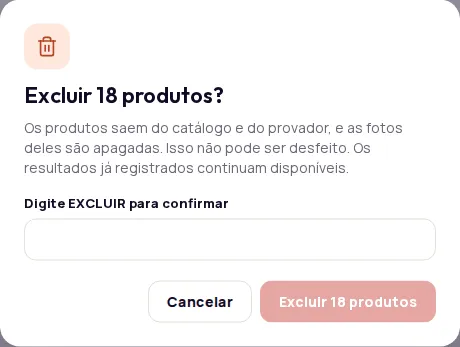
Section titled “Delete several products”- In Produtos › Catálogo, select the products. When you select them one by one, the limit is 100. For more, use Selecionar todos os (Select all), which shows the total and picks up every product in the current search and filters.
- In the action bar, click Excluir.
- To delete more than 10 products, or when you use Selecionar todos, type EXCLUIR in the confirmation field.
- Click the confirm button, which shows the number of products.
Follow the deletion
Section titled “Follow the deletion”Deletion runs in the background. A notice at the top of the catalog shows the progress, for example “12 de 40 excluídos” (12 of 40 deleted). You can keep using the dashboard in the meantime.
When it’s done, a message shows the result:
- How many products were deleted.
- How many couldn’t be deleted, if any. Try again with those products.
- If the deletion takes a while, the notice says it’s still running in the background. Click Atualizar (Refresh) in a few minutes to see the result.
If you see Muitas alterações seguidas. Aguarde um minuto e tente de novo. (Too many changes in a row. Wait a minute and try again.), wait a minute before deleting again.
Frequently asked questions
Does deleting a product in Provei remove it from my online store?
No. Deleting only affects the Provei catalog. The product stays in your store, just without the try-on.
Can I undo a deletion?
No. If you only want to take the product out of your store for a while, turn it off instead of deleting it.
Do the product's results disappear?
No. Results already recorded stay available in Resultados (Results).