Try-on window
The Janela do provador (Try-on window) is where shoppers upload their photo and see the result. Here you choose its format, tone, size and corners.
To open it, go to Experiência na loja › Elementos › Janela do provador (In-store experience › Elements › Try-on window). In the preview, the Provador aberto (Try-on open) moment shows the window.
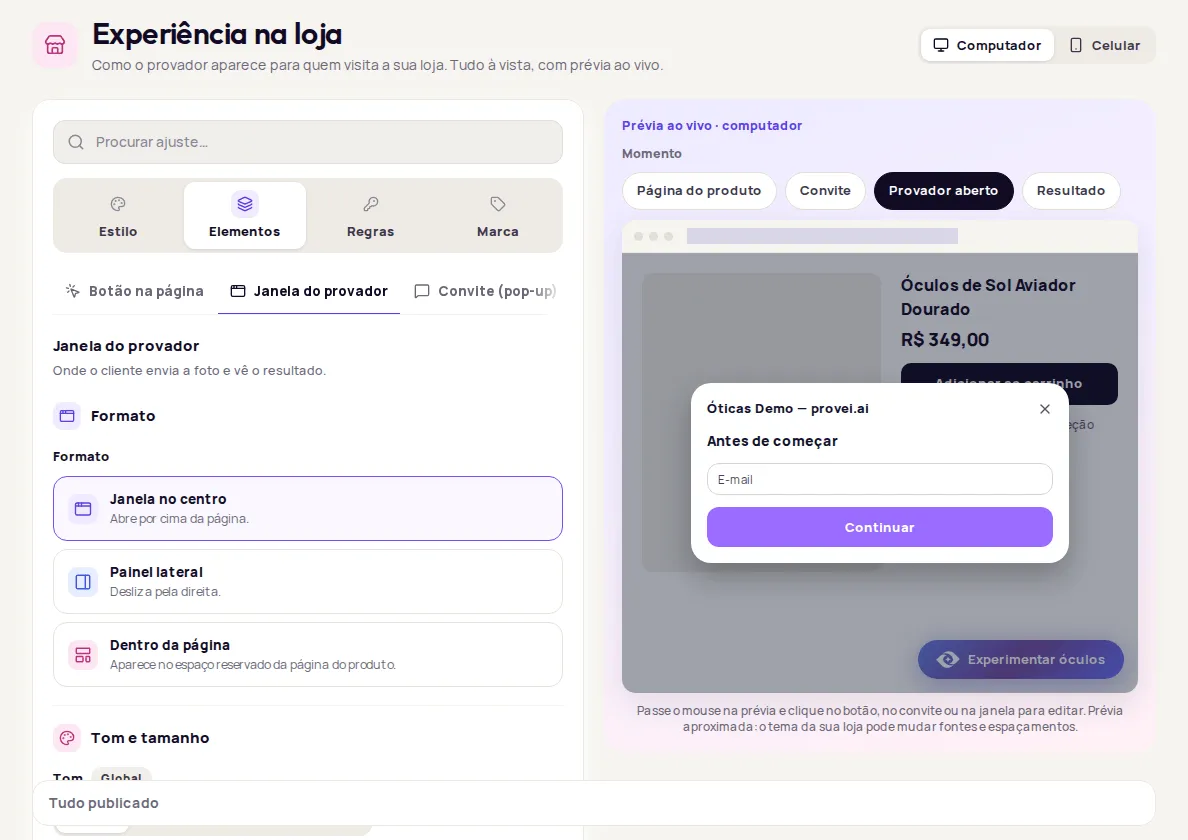
Choose the format
Section titled “Choose the format”| Format | How it appears |
|---|---|
| Janela no centro (Centered window) | Opens on top of the page. |
| Painel lateral (Side panel) | Slides in from the right. |
| Dentro da página (Inside the page) | Appears in a reserved space on the product page. |
To use Dentro da página, your store theme needs a reserved space for the try-on. Whoever maintains the theme can create that space and point to it under Para desenvolvedores (For developers), in the Seletor do espaço reservado (Reserved space selector) field.
Set the tone and size
Section titled “Set the tone and size”In the Tom e tamanho (Tone and size) section:
- Tom (Tone): Padrão (Default), Claro (Light), Escuro (Dark) or Minimalista (Minimalist). Tones other than the default are on paid plans.
- Tamanho (Size): Compacto (Compact), Padrão (Default), Grande (Large) or Personalizado (Custom). With Personalizado, type the width and the Altura máxima (Maximum height) in pixels (for example, 720). It also accepts a share of the screen, such as 90vw.
Size only applies to Janela no centro.
Set the corners
Section titled “Set the corners”In Cantos e sombra (Corners and shadow), pick one of the corner styles (Retos (Square), Suaves (Soft), Arredondados (Rounded) or Redondos (Round)) or type an exact value in pixels. With Painel lateral, the window sits flush against the edge of the screen, with no rounded corners.
Change the waiting message
Section titled “Change the waiting message”In Textos (Texts), the Mensagem enquanto a prova é gerada (Message while the try-on is generated) field shows during the few seconds it takes for the image to be ready. Left blank, Provei uses the default message. This setting is available on the Enterprise plan.
Choose which pages the try-on works on
Section titled “Choose which pages the try-on works on”In the Na página da loja (On the store page) section:
- Detectar página de produto pela URL (Detect product page by URL): opens the try-on when the page address identifies a compatible product.
- Mostrar em todas as páginas (Show on all pages): shows the floating button outside product pages too.
Result rating
Section titled “Result rating”In stores with a home try-on (furniture, floors and walls), this tab shows the Avaliação do resultado (Result rating) section. Click Abrir em Regras (Open in Rules) to turn on the survey. See Result rating (CSAT).
For developers
Section titled “For developers”The Para desenvolvedores section has settings for whoever maintains your store’s code:
- Seletor do espaço reservado: the element that holds the try-on in the Dentro da página format.
- Seletor de botão próprio (Own button selector): elements in your store that open the try-on when clicked. Leave it empty if there are none.
- Layers for the window and the button, for when another element of your store sits on top of them.
- CSS personalizado da janela (Custom window CSS).
Frequently asked questions
Which format should I choose?
Janela no centro (Centered window) works in any store. Painel lateral (Side panel) slides in from the right. Dentro da página (Inside the page) only works if your store theme has a reserved space for the try-on.
Why can't I change the window size?
Tamanho (Size) and Altura máxima (Maximum height) only apply to the Janela no centro format.