Size and measurement results
The Tamanho e medidas (Size and measurements) tab shows how the Guia de medidas (Size guide), Descubra seu tamanho (Find your size) and Comparar com uma peça (Compare with a garment) are being used. It only shows up in stores with these features. To open it, go to Resultados › Tamanho e medidas (Results › Size and measurements).
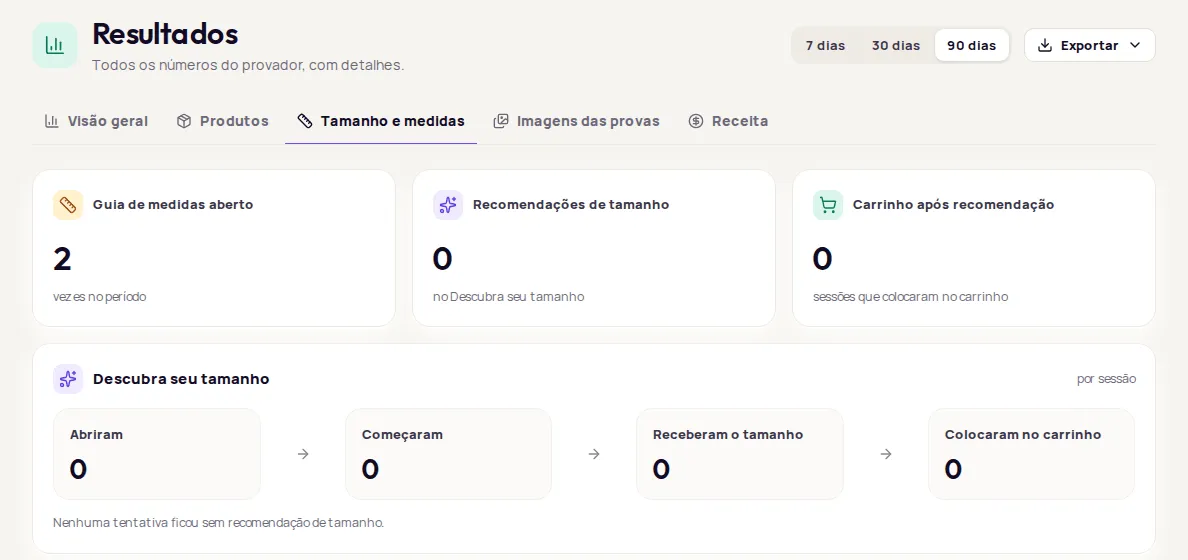
Numbers for the period
Section titled “Numbers for the period”You see the numbers for the features active in your store:
| Number | What it counts |
|---|---|
| Guia de medidas aberto (Size guide opened) | How many times the Guia de medidas was opened in the period. |
| Recomendações de tamanho (Size recommendations) | How many recommendations Descubra seu tamanho showed. |
| Carrinho após recomendação (Cart after recommendation) | How many visits added to cart after getting a size, and the percentage of those who got a size. |
Descubra seu tamanho funnel
Section titled “Descubra seu tamanho funnel”The Descubra seu tamanho card counts visits (sessions) in four stages: Abriram (Opened), Começaram (Started), Receberam o tamanho (Got a size) and Colocaram no carrinho (Added to cart).
Below the funnel you see useful notes, such as how many customers came back and looked at a size already worked out for them, or how many attempts couldn’t get a size recommendation.
Comparar com uma peça funnel
Section titled “Comparar com uma peça funnel”The Comparar com uma peça card counts visits in four stages: Abriram (Opened), Começaram (Started), Compararam (Compared) and Colocaram no carrinho (Added to cart). Below it, you see how many comparisons couldn’t be completed, if any.
To change the text, position and look of these features in your store, see Measurements and size on the product page.
Frequently asked questions
Why didn't some attempts get a size?
When Descubra seu tamanho (Find your size) can't recommend a size, the tab tells you how many attempts ended without a recommendation. Check that your products have a size chart.
I don't see the Tamanho e medidas tab. Why?
The tab only shows up in stores with the measurement features active.