Limit try-ons per customer
In Limites (Limits) you set how many try-ons each customer can do in a given period. Once the period is over, each customer gets their try-ons back.
To open it, go to Experiência na loja › Regras (In-store experience › Rules) and scroll down to Limites.
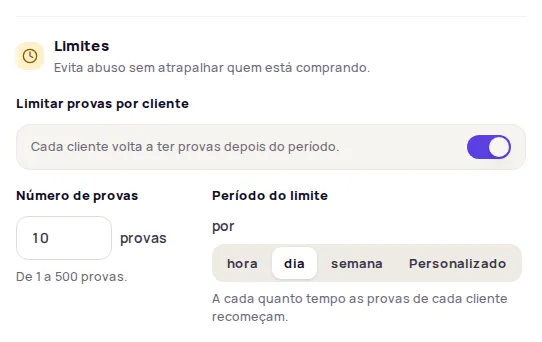
Set up the limit
Section titled “Set up the limit”-
Turn on Limitar provas por cliente (Limit try-ons per customer).
-
In Número de provas (Number of try-ons), enter how many try-ons each customer can do, from 1 to 500 try-ons.
-
In Período do limite (Limit period), choose hora (hour), dia (day) or semana (week). For another interval, choose Personalizado (Custom) and type a whole number from 1 to 168 hours (one week).
-
Click Publicar alterações (Publish changes).
The period sets how often each customer’s try-ons start over. To go back to the factory value, click Restaurar padrão (Restore default) next to the setting.
What the customer sees
Section titled “What the customer sees”When they reach the limit, the customer sees the message Você atingiu o limite de imagens (You’ve reached the image limit) in the try-on, with the time left until they can generate new images.
Frequently asked questions
What does the customer see when they reach the limit?
The try-on shows the message Você atingiu o limite de imagens (You've reached the image limit) and says how long until the person can generate new images.
What values can I use?
From 1 to 500 try-ons, per hour, per day, per week or over a custom period of 1 to 168 hours.