Size recommendation with Descubra seu tamanho
Descubra seu tamanho (Find your size) recommends a size to the customer on the product page. The recommendation compares the customer’s measurements with the size chart linked to the product.
What the customer sees
Section titled “What the customer sees”- On the product page, the customer clicks the Descubra seu tamanho link (the text may be different if you changed it in Experiência na loja (In-store experience)).
- Chooses the Modelo corporal (Body type): Feminino (Female) or Masculino (Male).
- Enters Altura (Height), Peso (Weight) and Idade (Age). Or clicks Tenho medidas (I have my measurements) and enters bust or chest, waist and hip circumferences. The window explains Como medir (How to measure).
- With height, weight and age, adjusts the body shape in the Ajuste seu corpo (Adjust your body) step, if needed.
- Sees the Tamanho recomendado (Recommended size) and an illustration of the fit in each area.
- Can tap another size to compare and, when the store allows it, click Adicionar ao carrinho (Add to cart).
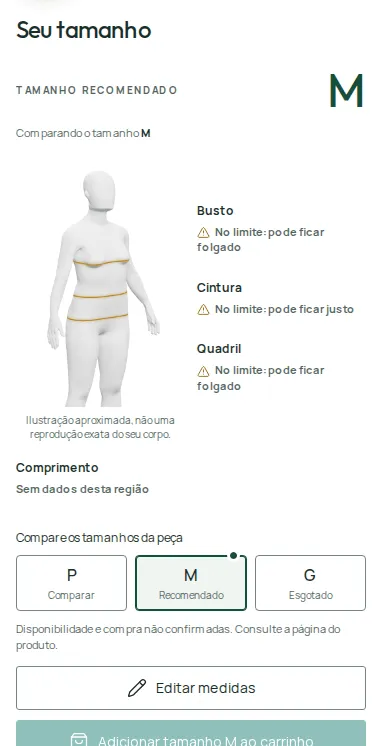
The recommended size comes preselected. The customer can add that size straight to the cart or pick another one.
Reading the fit
Section titled “Reading the fit”For each area, the window shows one of these labels:
- Na faixa sugerida (In the suggested range): the size fits well in this area.
- No limite: pode ficar justo (At the limit: may be tight) or No limite: pode ficar folgado (At the limit: may be loose).
- Pode ficar justo (May be tight) or Pode ficar folgado (May be loose).
- Sem dados desta região (No data for this area): the chart doesn’t have this measurement.
When no size falls within range in every area, you’ll see Mais próximo pela tabela (Closest by the chart) or Mais próximo disponível (Closest available), with a note to check the warnings before buying.
When your store provides availability, sizes show as Disponível (Available) or Esgotado (Sold out), and the recommendation picks from the available ones. Without that information, the result shows as Sugestão pela tabela (Suggestion based on the chart).
Saved profile
Section titled “Saved profile”The customer’s measurements are saved in their browser, for your store only, until they click Recomeçar perfil (Start profile over). That way they don’t have to fill everything in again on other products.
How the recommendation works
Section titled “How the recommendation works”- Provei estimates the customer’s body measurements from height, weight and age, or uses the measurements they entered.
- It identifies the garment type from the product name (for example, pants, dress or T-shirt) and uses the measurements that matter for that type.
- In charts with garment measurements, the measurements are converted into equivalent body measurements before the comparison.
- The product’s fit adjustments, if any, are part of that comparison.
- Only the sizes selected on the product can be recommended.
What the product needs
Section titled “What the product needs”- To be active in the catalog, with the correct Link do produto na loja (Product link in the store).
- A linked chart, with sizes selected.
- The chart can’t be set to Somente exibição (Display only). Use Medidas do corpo (Body measurements), Peça medida em superfície plana (Garment measured flat) or Circunferência da peça (Garment circumference).
- The main measurements for the garment type must be filled in for every size. See Create size charts.
- The Descubra seu tamanho link must be turned on in Experiência na loja › Elementos › Medidas e tamanho (In-store experience › Elements › Measurements and size). See Measurements and size in the store.
To track usage and results for this feature, see Size results.
Frequently asked questions
Does Descubra seu tamanho use credits?
No. The recommendation is calculated from the customer's measurements and your chart, without generating images.
Does the customer need to know their own measurements?
No. They can enter just height, weight and age. Customers who know their measurements can enter bust or chest, waist and hips.
Does the recommendation take stock into account?
When your store provides availability, yes. If the best size is sold out, the closest available size shows instead.