Store health on the Home screen
Saúde da loja (Store health) is the checklist on the Início (Home) screen. Each row tells you one thing: whether there are products in the try-on, whether customers are opening the try-on in your store and, for fashion stores, whether your products have a size chart.
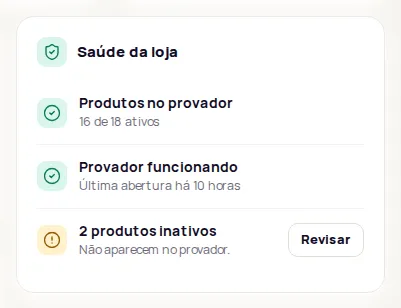
Each row has a green icon (all good) or a yellow one (needs attention). When there is something to do, the row has a button that takes you to the right screen.
Products
Section titled “Products”| Alert | What it means | What to do |
|---|---|---|
| Produtos no provador (Products in the try-on) | Shows how many products are active out of the total added, for example “120 de 130 ativos” (120 of 130 active). | Nothing, if the number looks right. |
| Nenhum produto cadastrado (No products added) | The catalog is empty. The try-on doesn’t show in your store. | Click Adicionar (Add). See Add products from a link. |
| N produtos inativos (N inactive products) | These products don’t show in the try-on. | Click Revisar (Review) to see the list and turn on the ones that should show. |
| Produtos (with a loading warning) | We couldn’t load your products right now. | Reload the page in a few moments. |
Try-on in your store
Section titled “Try-on in your store”This row is based on try-on opens recorded in your store.
| Alert | What it means | What to do |
|---|---|---|
| Provador funcionando (Try-on working) | Someone opened the try-on in your store in the last 7 days. The row shows when the last open was. | Nothing. |
| Sem aberturas recentes (No recent opens) | The last open was more than 7 days ago. | Click Ver instalação (See installation) and check that the button shows on your product pages. |
| Nenhuma abertura nos últimos 90 dias (No opens in the last 90 days), with “O código está na loja” (The code is in your store) | The code loads in your store, but nobody opened the try-on. | Check that the button shows on your product pages. See The button doesn’t show. |
| Nenhuma abertura nos últimos 90 dias, with “O provador não carregou na loja” (The try-on didn’t load in your store) | We didn’t see the code in your store during that time. | Click Ver instalação and install or paste the code again. See Test the installation. |
Size charts
Section titled “Size charts”Shows for fashion stores that use size charts.
| Alert | What it means | What to do |
|---|---|---|
| Tabelas de medidas em dia (Size charts up to date) | All active products have a chart. | Nothing. |
| N sem tabela de medidas (N without a size chart) | These products have no size guide and no size recommendation. | Click Vincular (Link). See Measurements and sizes. |
Other cards on the Home screen
Section titled “Other cards on the Home screen”- Créditos (Credits): your available balance and about how many days it should last at this month’s pace. Only the account owner sees it. See How credits work.
- Provas e adições ao carrinho por dia (Try-ons and add-to-carts per day) and Produtos mais provados (Most tried-on products): numbers for the period you pick (7, 30 or 90 days). See Results.
- Medidas e tamanho (Measurements and size): how many times the size guide was opened, and how many size recommendations and comparisons with the customer’s own garment were made.
- Receita com o provador (Revenue from the try-on): shows when Google Analytics 4 is connected. See Connect Google Analytics 4.
If a row disappears from the list, that information doesn’t apply to your store or couldn’t be read at that moment. Reload the page to try again.
Frequently asked questions
What does Nenhuma abertura nos últimos 90 dias mean?
It means "no opens in the last 90 days". Nobody opened the try-on in your store in the last 90 days. If the code didn't load in your store during that time, check the installation. If it did, check that the button shows on your product pages.
Why doesn't an inactive product show in the try-on?
The try-on only shows on the pages of active products in your catalog. Click Revisar (Review) on the inactive products row to see which ones they are.