Connect WhatsApp (Tallos)
Tallos connects your store’s WhatsApp Business to Provei. Once connected, Provei receives messages and replies automatically. You connect it in Conta › Integrações › WhatsApp (Tallos) (Account › Integrations › WhatsApp (Tallos)).
Before you start
Section titled “Before you start”- A Tallos account with your store’s WhatsApp Business.
- The Tallos API token, created in Tallos under Apps › Integrações › API (Apps › Integrations › API).
Connect
Section titled “Connect”-
In Conta › Integrações, on the WhatsApp (Tallos) card, click Conectar (Connect).
-
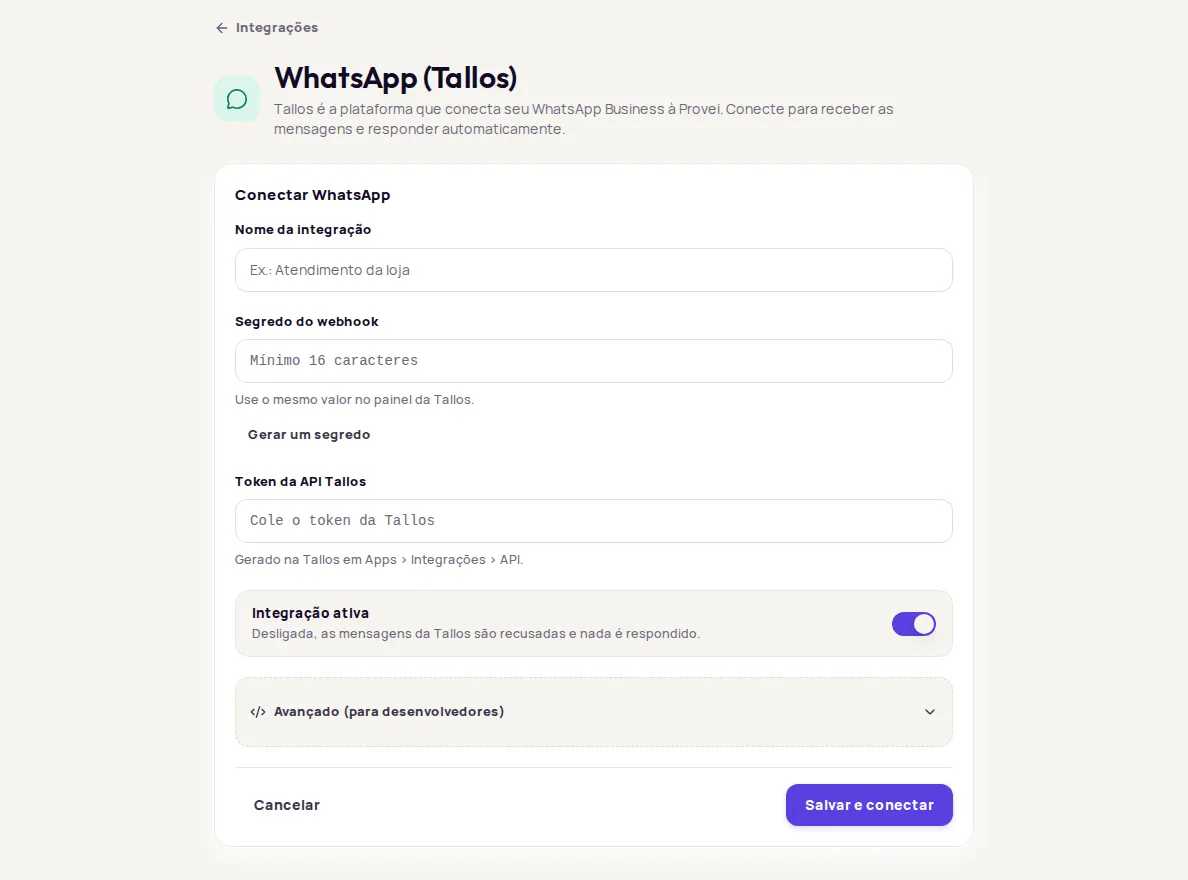
Click Conectar WhatsApp (Connect WhatsApp).
-
Fill in Nome da integração (Integration name), for example “Atendimento da loja” (Store support).
-
In Segredo do webhook (Webhook secret), type a value with at least 16 characters or click Gerar um segredo (Generate a secret). Keep this value: it also goes into the Tallos dashboard.
-
In Token da API Tallos (Tallos API token), paste the token you created in Tallos.
-
Leave Integração ativa (Integration active) on and click Salvar e conectar (Save and connect).
-
On the Endereço do webhook (Webhook address) card, click Copiar endereço (Copy address).
-
In the Tallos dashboard, under Apps › Integrações › Webhooks (Apps › Integrations › Webhooks), paste the address you copied and the same secret from step 4.
On the Integrações screen, the card now shows Conectado (Connected). If Integração ativa is off, it shows Pausado (Paused).
Pause or disconnect
Section titled “Pause or disconnect”- Pause: turn off Integração ativa and save. While it’s off, messages from Tallos are refused and nothing is answered.
- Disconnect: click Desconectar (Disconnect) and confirm. Messages from Tallos stop arriving right away. To reconnect, you’ll need to enter the secret and the token again.
Advanced settings
Section titled “Advanced settings”Avançado (para desenvolvedores) (Advanced, for developers) holds Identificador (Identifier), Endereço da API Tallos (Tallos API address) and Autenticação na API Tallos (Tallos API authentication). Only change these fields if Tallos asks you to. You only need to change the authentication if Tallos refuses the token.
Common problems
Section titled “Common problems”- O segredo precisa de pelo menos 16 caracteres. (The secret must have at least 16 characters.): use Gerar um segredo.
- Cole o token gerado na Tallos. (Paste the token created in Tallos.): the token field is empty.
- Confira os campos e tente de novo. (Check the fields and try again.): one of the values was refused. Check the token and the advanced fields.
- Ninguém conectou o WhatsApp desta loja ainda. (Nobody has connected this store’s WhatsApp yet.): team members see this. Ask the account owner to connect it.
Frequently asked questions
What is Tallos?
Tallos is the platform that connects your WhatsApp Business to Provei. Once connected, Provei receives messages and replies automatically.
Can a team member connect WhatsApp?
Only the account owner can connect or change the Tallos account. Once it's connected, the team can change the name, the token and the identifier, and turn the integration on or off.