Eyewear try-on
In the eyewear try-on, the customer uploads a selfie and sees the frame on their own face. From the result, they add to the cart the variant they were viewing on the page.
Before you start
Section titled “Before you start”- The product must be active in the catalog as eyewear, with the same link as the store page.
- The product photo must show the frame clearly. See Product photo requirements.
- Fill in the product’s Especificações da armação (Frame specifications) to show the size in the result (see below).
What the customer sees
Section titled “What the customer sees”-
Selfie. The window asks Envie sua selfie (Upload your selfie) and explains: Olhe de frente, sem óculos, com o rosto bem iluminado (Look straight ahead, without glasses, with your face well lit). On a phone, Tirar Foto (Take photo) opens the front camera. The customer can also pick a photo from the gallery.
-
Generation. The image starts generating as soon as the selfie is chosen. While they wait, the window reminds them that O resultado é uma simulação visual, não uma medida de ajuste. (The result is a visual simulation, not a fit measurement.)
-
Result. The customer sees the glasses on their face, the product name and, if you filled in the measurements, the Armação (Frame) line with the size (for example,
52□18 140). -
Cart. The variant selected on the product page comes preselected. If there’s more than one variant, the customer can switch it in Escolha a variação: (Choose the variant) before tapping Adicionar ao Carrinho (Add to cart).
Frame specifications
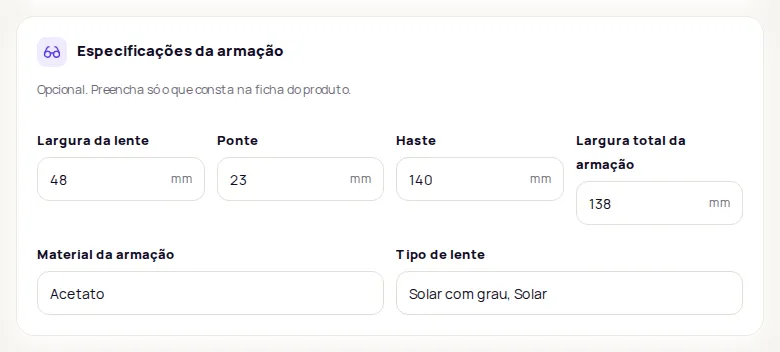
Section titled “Frame specifications”On the product page in the dashboard, the Especificações da armação section is optional. Fill in only what’s on the product’s spec sheet:
- Largura da lente (Lens width, mm)
- Ponte (Bridge, mm)
- Haste (Temple, mm)
- Largura total da armação (Total frame width, mm)
- Material da armação (Frame material)
- Tipo de lente (Lens type)
With Largura da lente and Ponte filled in, the result shows the frame size in the format opticians use. Haste is added at the end when it’s filled in.
Frequently asked questions
Does the eyewear try-on show whether the frame fits the customer's face?
No. The result is a visual simulation, not a fit measurement. To help customers choose, fill in the product's Especificações da armação (Frame specifications).
Can the customer wear glasses in the selfie?
It's best to take off their current glasses. The window asks for a front-facing photo, without glasses and with the face well lit.