Plan and credits
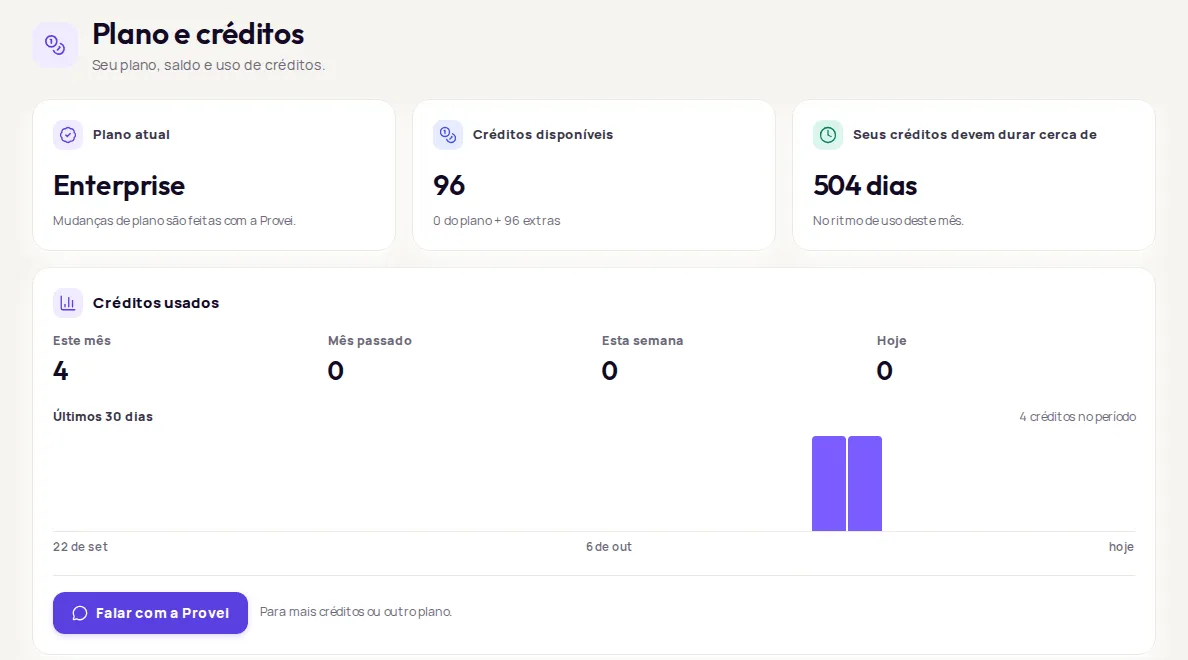
The Conta › Plano e créditos (Account › Plan and credits) screen shows your store’s plan, your available credits, about how many days they should last and how much you’ve used. It only shows information: plan changes and top-ups are handled with Provei.
Current plan
Section titled “Current plan”Plano atual (Current plan) shows the plan name: Starter, Growth, Professional or Enterprise. If you see Sem plano ativo (No active plan), contact Provei.
To compare plans and see what each one costs, go to the Provei pricing page.
Available credits
Section titled “Available credits”Créditos disponíveis (Available credits) is the balance you can use right now. The bar shows how much of your plan’s limit is left. If you have extra credits, the balance is split, for example “400 do plano + 100 extras” (400 from the plan + 100 extra).
How long your credits will last
Section titled “How long your credits will last”Seus créditos devem durar cerca de (Your credits should last about) shows how many days your balance should last at this month’s pace.
- Sem previsão (No estimate): there hasn’t been any usage this month to base an estimate on.
- Esgotados (Used up): your balance ran out. The try-on won’t create new try-ons until you top up.
Credits used
Section titled “Credits used”The Créditos usados (Credits used) card shows your credit usage:
- Este mês (This month), with the change compared to last month.
- Mês passado (Last month).
- Esta semana (This week).
- Hoje (Today).
- A chart with the credits used on each of the last 30 days.
The comparison with last month and the chart show for people who also have access to Resultados (Results).
Get more credits or change plans
Section titled “Get more credits or change plans”-
In Conta › Plano e créditos, click Falar com a Provei (Talk to Provei).
-
The conversation opens on WhatsApp. Tell us whether you want more credits or a different plan.
If you see Indisponível agora
Section titled “If you see Indisponível agora”Indisponível agora (Unavailable right now) means only that piece of information didn’t load. Click Tentar de novo (Try again). If it keeps happening, contact Provei. A failure to load the balance doesn’t change anything about the try-on in your store.
Frequently asked questions
How do I change plans or buy more credits?
Plan changes are handled with Provei. In Plano e créditos (Plan and credits), click Falar com a Provei (Talk to Provei).
Why don't I see Plano e créditos in the menu?
Only the account owner sees this screen. People invited to the team don't have access to the plan or credits.
What are the Provei plans?
Starter, Growth, Professional and Enterprise. To find out what each one includes, contact Provei.