Send instructions to whoever runs your store
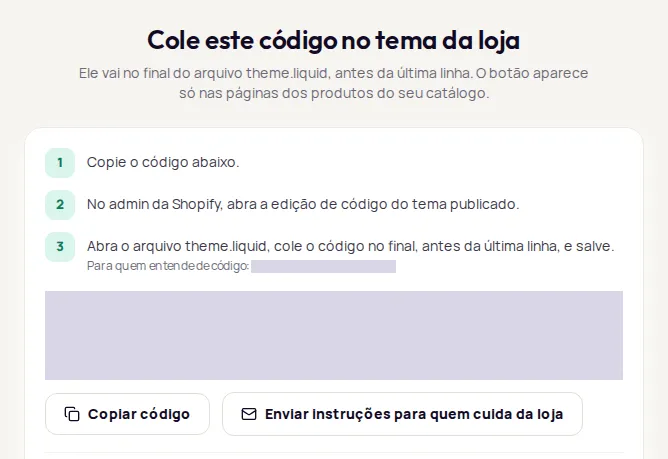
If someone else edits your store theme, use the Enviar instruções para quem cuida da loja (Send instructions to whoever manages the store) button on the Instalação (Installation) screen. It opens a ready-made message in your email app with the steps for your platform and the code.
Send the instructions
Section titled “Send the instructions”-
In Instalação, choose your store platform and click Continuar (Continue). On Shopify, also enter your
.myshopify.comaddress. -
If your account has more than one try-on, choose which one to install now. The email carries the code for that try-on.
-
Click Enviar instruções para quem cuida da loja.
-
In your email app, add the recipient, review the message and send it.
Using more than one try-on? Repeat the steps and choose each one, or send one email per try-on.
What’s in the email
Section titled “What’s in the email”- Subject: Instalar o provador da Provei na loja (Install the Provei try-on in the store).
- The steps for where to paste the code on your platform.
- The installation code.
- A reminder to open a product page and check that the button shows.
- A link to the documentation.
When the code is too long to fit in the email, the message carries the equivalent short version, the Botão automático (Automatic button) one.
After they install it
Section titled “After they install it”- Ask them to let you know when the theme is saved and published.
- In Instalação, click Já instalei (I’ve installed it), paste a product link and click Testar (Test). See Test the installation.
- Open the product page in your store and check the button.
Frequently asked questions
Who is the email sent to?
The button opens a ready-made message in your email app, with no recipient. You choose who to send it to.
Does the person installing it need access to the Provei dashboard?
No. The email has the code and the steps. Once they publish, you run the test yourself in Instalação (Installation).