Log in to the Provei dashboard
Log in to the dashboard at app.provei.ai/v2/login with your account email and password. Accounts are created by invitation: there is no open sign-up.
Who gets access
Section titled “Who gets access”- Account owner: gets access from Provei when the store is activated.
- Team: the owner invites other people in Conta › Equipe (Account › Team). Each person gets an email to create their own password. See Team.
Log in
Section titled “Log in”-
Open app.provei.ai/v2/login.
-
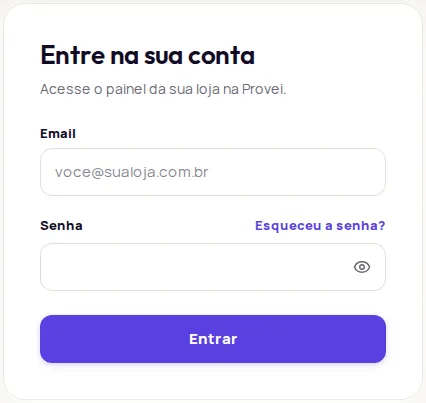
Fill in Email and Senha (Password) and click Entrar (Log in).
-
The dashboard opens on the Início (Home) screen.
If you see Email ou senha incorretos. Confira e tente de novo. (Wrong email or password. Check and try again.), make sure you are using the same email the invitation went to. If you see Muitas tentativas de login. Aguarde um instante e tente novamente. (Too many login attempts. Wait a moment and try again.), wait a little before trying again.
Reset your password
Section titled “Reset your password”-
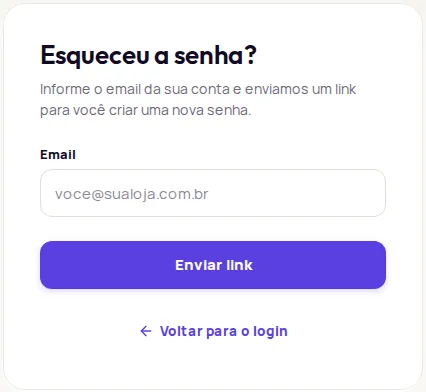
On the login screen, click Esqueceu a senha? (Forgot your password?).
-
Enter your account email and click Enviar link (Send link).
-
Open the email from Provei and click the link. If you can’t find it, check your spam folder.
-
Create a new password with at least 8 characters, type it again in the second field and click Salvar nova senha (Save new password).
If you see Este link não vale mais (This link is no longer valid), the link has expired or was already used. Request a new one from the Esqueceu a senha? screen.
Find your way around the menu
Section titled “Find your way around the menu”The menu on the left shows only what is active on your account.
| Item | What it is for |
|---|---|
| Início (Home) | Store summary, Store health and credits. |
| Produtos (Products) | Catálogo (Catalog), Adicionar produtos (Add products) and Tabelas de medidas (Size charts). |
| Experiência na loja (In-store experience) | The try-on button, colors and texts in your store. |
| Clientes (Customers) | Contact details left in the try-on. |
| Resultados (Results) | Try-ons, add-to-carts and revenue. |
| Instalação (Installation) | The code to paste into your store, and the test. |
| Outros produtos (Other products) | Studio and Video Commerce, when active. |
| Conta (Account) | Plano e créditos (Plan and credits), Equipe (Team), Integrações (Integrations), Desenvolvedor (Developer) and Ajuda (Help). |
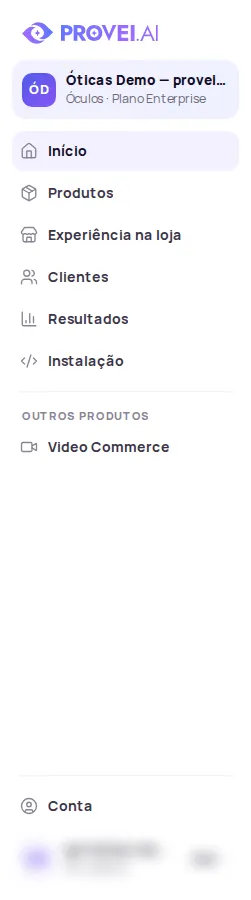
Team members do not see Equipe or Plano e créditos.
Alerts on the Home screen
Section titled “Alerts on the Home screen”- Seu plano ainda não foi configurado (Your plan hasn’t been set up yet): Provei hasn’t activated the store’s plan yet. Contact support.
- Sua loja ainda não foi configurada (Your store hasn’t been set up yet): the store’s segment still needs to be set. Contact support.
- O provador ainda não está ativo na sua loja (The try-on isn’t active in your store yet): no try-on has been activated on the account. Contact support.
Support: suporte@provei.ai or WhatsApp +55 11 5296-0168. Inside the dashboard, use Conta › Ajuda › Abrir conversa (Account › Help › Start a conversation).
Frequently asked questions
How do I create a Provei account?
Accounts are created by invitation. The store owner gets access from Provei, and the people who work with them are invited in Conta › Equipe (Account › Team). There is no open sign-up on the website.
I forgot my password. What do I do?
On the login screen, click Esqueceu a senha? (Forgot your password?), enter your account email and use the link we email you to create a new password.
Why don't I see some options in the menu?
The menu shows only the products and areas active on your account. People invited to the team also do not see Equipe (Team) or Plano e créditos (Plan and credits).