Watermark on try-on images
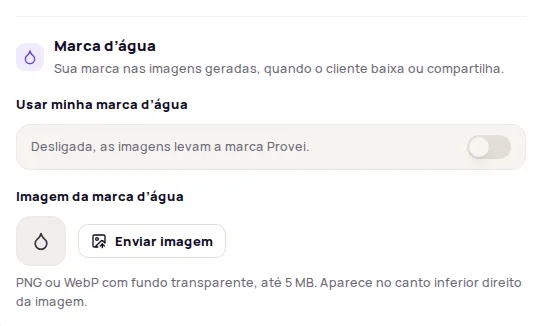
The Marca d’água (Watermark) puts your store’s brand on the images the try-on generates, when customers download or share their result. Without your own watermark, the images carry the Provei brand.
This feature is available on the Enterprise plan. On other plans, the section shows Disponível no plano Enterprise (Available on the Enterprise plan) and the Falar com a Provei (Talk to Provei) button.
To open it, go to Experiência na loja › Regras (In-store experience › Rules) and scroll down to Marca d’água.
Turn on the watermark
Section titled “Turn on the watermark”-
In Imagem da marca d’água (Watermark image), click Enviar imagem (Upload image) and pick a PNG or WebP with a transparent background, up to 5 MB.
-
Turn on Usar minha marca d’água (Use my watermark).
-
Click Publicar alterações (Publish changes).
The watermark appears in the bottom right corner of the image. In the preview, the Resultado (Result) moment shows how it looks.
Replace or remove the watermark
Section titled “Replace or remove the watermark”- To replace it, click Trocar imagem (Replace image), pick the new file and publish.
- To go back to the Provei brand, turn off Usar minha marca d’água and publish.
- Removing the image also turns off your own watermark.
Frequently asked questions
Do the images already have a watermark?
Yes. Without your own watermark, the images carry the Provei brand.
Where does the watermark appear on the image?
In the bottom right corner of the generated image.