Create size charts
A size chart stores the measurements of each size, in centimeters. It feeds the Guia de medidas (Size guide), Descubra seu tamanho (Find your size) and Comparar tamanhos (Compare sizes). One chart can serve many products.
Create a chart
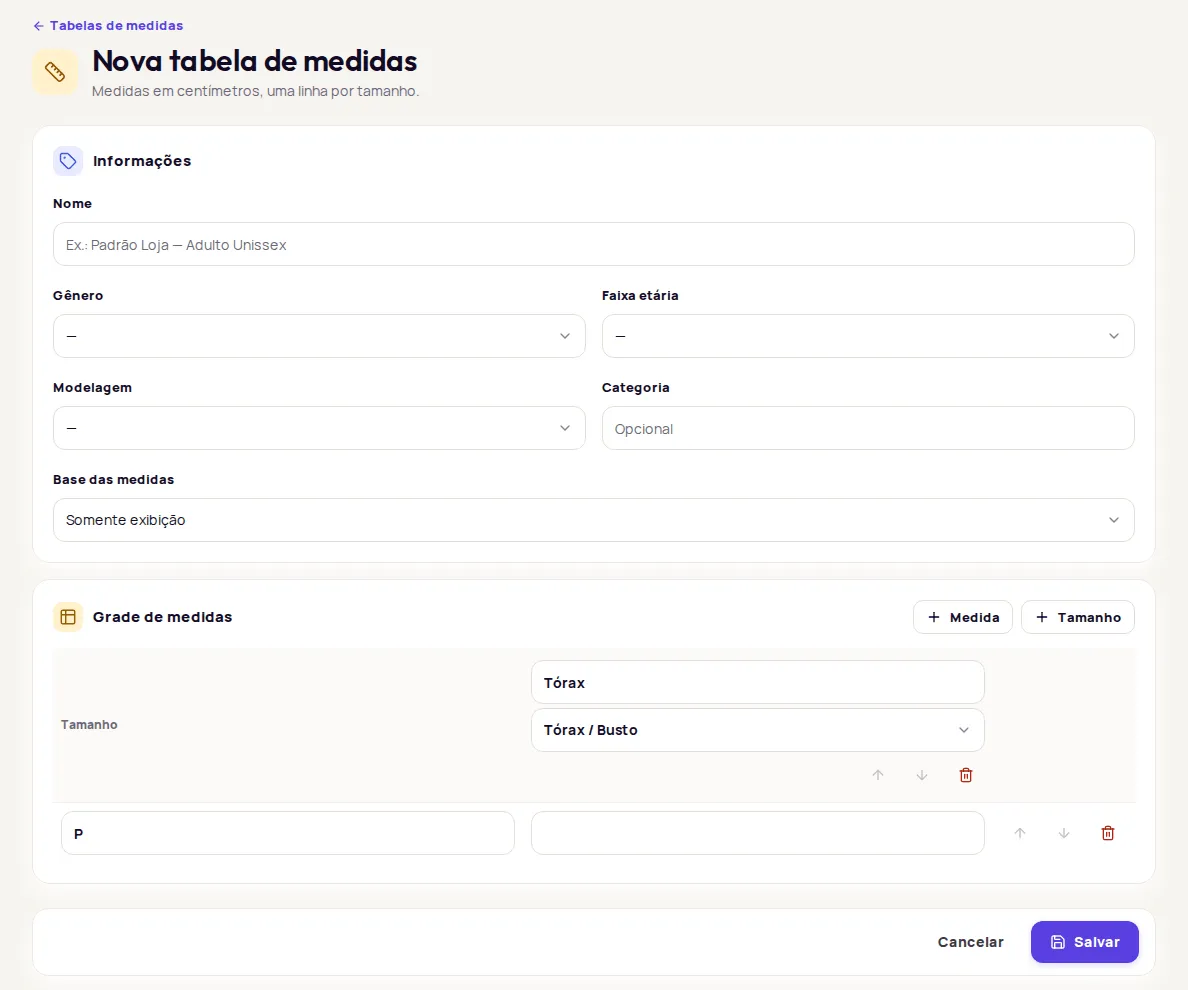
Section titled “Create a chart”- Open Produtos › Tabelas de medidas (Products › Size charts) and click Nova tabela (New chart).
- In Informações (Details), fill in the Nome (Name), for example “Padrão Loja Adulto Unissex”.
- Fill in the optional fields: Gênero (Gender), Faixa etária (Age group), Modelagem (Fit) and Categoria (Category).
- Choose the Base das medidas (Measurement basis). See the section below.
- In Grade de medidas (Measurement grid), use the Medida (Measurement) button to add columns and the Tamanho (Size) button to add rows.
- For each column, type the label and choose the measurement type. For each row, type the size, for example P.
- Fill in the values in centimeters and click Salvar (Save).
Choose the measurement basis
Section titled “Choose the measurement basis”The Base das medidas field tells Provei what the numbers in the chart represent. A new chart starts as Somente exibição (Display only).
| Basis | When to use it | Descubra seu tamanho |
|---|---|---|
| Medidas do corpo (Body measurements) | The chart shows the wearer’s measurements (the customer’s bust, waist, hips). | Yes |
| Peça medida em superfície plana (Garment measured flat) | You measured the garment laid flat on a table, from one side to the other. | Yes |
| Circunferência da peça (Garment circumference) | You measured all the way around the garment. | Yes |
| Somente exibição (Display only) | The chart should only appear in the Guia de medidas. | No |
With a garment basis, you can enter the measurements of the garment itself. Provei converts them into equivalent body measurements and compares them with the customer’s.
Choose the right measurements
Section titled “Choose the right measurements”Each column has a free-text label and a type. The type is what the recommendation uses. The options are Tórax / Busto (Chest / Bust), Cintura (Waist), Quadril (Hips), Ombro (Shoulder), Comprimento (Length), Entrepernas (Inseam), Comprimento lateral (Side length), Barra (Hem), Gancho frente (Front rise), Gancho costas (Back rise) and Personalizada (Custom).
For Descubra seu tamanho to work, fill in the main measurements for the garment type in every size:
- Blouses, shirts, T-shirts, coats: Tórax / Busto. Ombro and Comprimento help.
- Pants, skirts, shorts, leggings: Cintura and Quadril. Entrepernas helps.
- Dresses, jumpsuits, overalls: Tórax / Busto, Cintura and Quadril. Comprimento helps.
Provei identifies the garment type from the product name. Use clear names, such as “Calça jeans reta” or “Vestido midi”.
Personalizada columns appear in the Guia de medidas, but they don’t count toward the recommendation.
Find, edit and organize charts
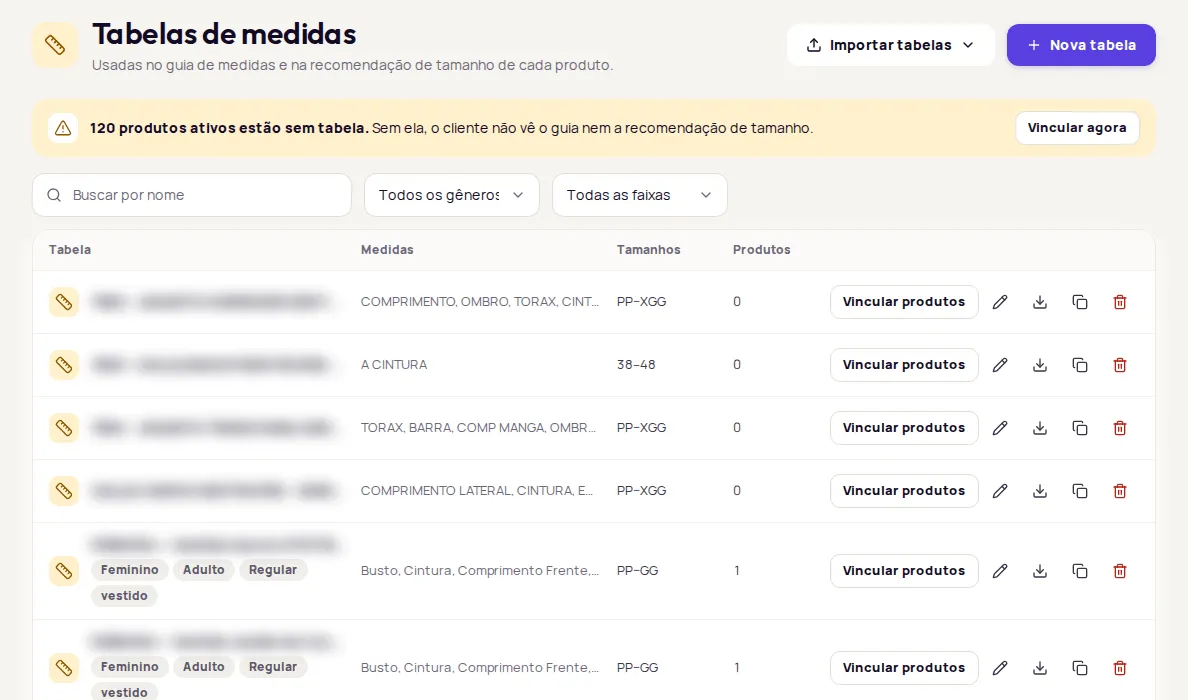
Section titled “Find, edit and organize charts”For each chart, the list shows the Medidas (Measurements), the Tamanhos (Sizes) and how many Produtos (Products) use it. Search by name or filter by Gênero and Faixa etária.
On each chart’s row you can:
- Editar (Edit): opens the chart. Changes apply to every linked product.
- Vincular produtos (Link products): applies the chart to many products. See Link size charts to products.
- Duplicar (Duplicate): creates an independent copy, handy for setting up a similar grid.
- Exportar (Export): downloads the chart as a CSV.
- Excluir (Delete): erases the chart.
If you see Tabela desatualizada (Chart out of date) when saving, someone else changed the chart while you were editing. Click Recarregar tabela (Reload chart), redo your change and save.
Delete a chart
Section titled “Delete a chart”If the chart has no linked products, confirm in Excluir tabela (Delete chart). If it does, the dashboard warns that those products will be left without a chart and customers will stop seeing the size guide and size recommendation on them. To go ahead, click Desvincular e excluir (Unlink and delete).
You can’t undo a deletion. Before deleting, link another chart to the products if they should keep the size features.
Frequently asked questions
My chart has the garment's measurements, not the body's. Can I use it?
Yes. Choose Peça medida em superfície plana (Garment measured flat) or Circunferência da peça (Garment circumference) in Base das medidas (Measurement basis). Provei converts the garment measurements into equivalent body measurements to recommend a size.
What is Somente exibição for?
Somente exibição (Display only) is for charts that should only appear in the Guia de medidas (Size guide). With this basis, Descubra seu tamanho (Find your size) doesn't show up on the product.
If I edit a chart, do the linked products change?
Yes. Products use the linked chart, so the change applies to all of them.