LGPD in your store with the virtual try-on
When you use Provei, your store decides what data it asks shoppers for and what it uses that data for. Provei processes the data to provide the service to your store. This page sums up what’s up to you and the tools Provei offers. The LGPD is Brazil’s general data protection law.
What’s up to your store
Section titled “What’s up to your store”- Inform your customers. State in your store’s privacy policy that you use the Provei virtual try-on and what data you ask for (photo, contact details, answers).
- Ask only for what you need. In Experiência na loja › Regras (In-store experience › Rules), choose the access level that makes sense. With Prova direto (Try on right away), the shopper tries on without leaving contact details. See Access rules and contacts.
- Respect consent. Send offers only to people who agreed to be contacted.
- Handle deletion requests. Use Apagar dados (Delete data) in Clientes (Customers), and also delete the copies in your CRM, WhatsApp or email.
- Take care of the generated images. The images in Resultados › Imagens das provas (Results › Try-on images) are your customers’ data. Don’t publish them or use them in campaigns without permission.
- Control who can access the dashboard. Give each team member their own access and remove people who leave. See Best practices for keys and access.
Consent for contact
Section titled “Consent for contact”When a shopper leaves their details before trying on, the form shows a consent box, as the LGPD requires. The text mentions your brand and the channels the shopper filled in, for example: Aceito receber contato de Minha Loja por e-mail ou WhatsApp sobre produtos e ofertas. (I agree to be contacted by Minha Loja by email or WhatsApp about products and offers.) Right below it: Você pode retirar esse consentimento a qualquer momento. (You can withdraw this consent at any time.)
- The box is optional and starts unchecked.
- The shopper can try on without checking it.
- The form includes a link to the Provei Privacy Policy.
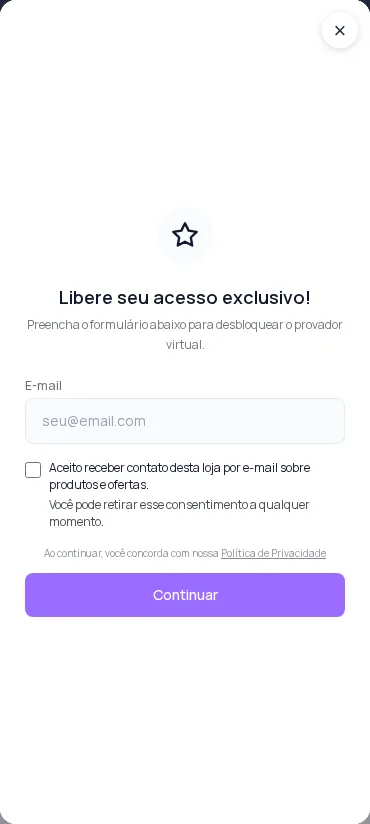
In the dashboard, the customer’s profile in Clientes shows whether the person agreed to be contacted:
| In the profile | What to do |
|---|---|
| Autorizou receber contato de marketing em (date) (Agreed to receive marketing contact on) | You can send news and offers through the contact details the person left. |
| Sem autorização registrada (No authorization recorded) | Answer questions, but avoid sending offers. |
Handle a deletion request
Section titled “Handle a deletion request”- In Clientes, open the person’s profile.
- Tap Apagar dados.
- Read what will be deleted. The window says: Apagamos nome, contato, respostas, provas e histórico dessa pessoa na Provei. (We delete this person’s name, contact details, answers, try-ons and history at Provei.) If the person used more than one device, the window lists the devices.
- Type EXCLUIR and confirm.
- Delete the copies you already sent to your CRM, WhatsApp or email directly in those tools. Deleting in Provei doesn’t reach those copies.
Deletion can’t be undone, and the dashboard totals may go down. Store catalog images used in the try-ons are kept, because they aren’t customer data. The full step-by-step guide is in Delete a customer’s data (LGPD).
Contact
Section titled “Contact”For questions about how Provei handles data, write to suporte@provei.ai.
Frequently asked questions
Can I send offers to every shopper who left their contact details in the try-on?
Only to those who checked the consent box. In the customer's profile in Clientes (Customers), those who agreed show Autorizou receber contato de marketing (Agreed to receive marketing contact). Without a recorded authorization, answer questions but avoid sending offers.
Does the consent box come pre-checked?
No. It's optional and starts unchecked. The shopper checks it if they want to be contacted.
Who handles a customer's deletion request?
Your store receives the request and can fulfill it in Clientes with Apagar dados (Delete data). If the customer asks Provei directly, the contact is suporte@provei.ai.