Delete a customer's data (LGPD)
When a customer asks for their data to be deleted under Brazil’s data protection law (LGPD), use Apagar dados (Delete data) in that person’s profile, in Clientes (Customers). The confirmation window says what gets deleted: Apagamos nome, contato, respostas, provas e histórico dessa pessoa na Provei. (We delete this person’s name, contact, answers, try-ons and history at Provei.) Copies you sent to your CRM, WhatsApp or email have to be deleted there.
Delete the data
Section titled “Delete the data”-
In Clientes, search for the person by name, email or phone and open their profile.
-
Click Apagar dados at the bottom of the profile, or open Mais ações do cliente (More customer actions) and choose Apagar dados (Pedido de exclusão (LGPD), that is LGPD deletion request).
-
Read the Apagar os dados de “…”? (Delete the data of “…”?) confirmation. If the person used more than one device, the window lists the devices that will be deleted.
-
Type EXCLUIR in the Digite EXCLUIR para confirmar (Type EXCLUIR to confirm) field.
-
Click Apagar dados.
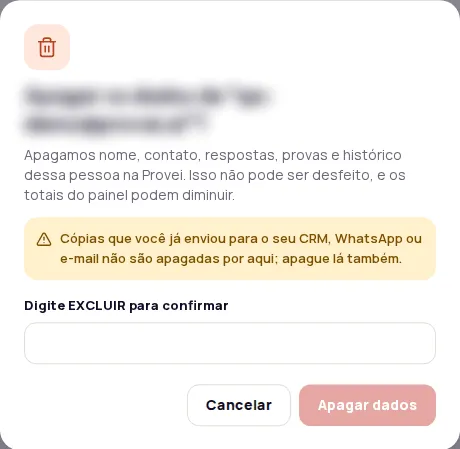
When it finishes, you see Dados de … apagados (Data of … deleted) and the person leaves the list.
Messages you may see
Section titled “Messages you may see”| Message | What to do |
|---|---|
| Dados de … apagados (Data of … deleted) | Done. If it says images from the store catalog were kept, that’s expected: they aren’t customer data. |
| Apagando os dados de … (Deleting the data of …) | One part still needs to finish. Delete again in a few moments to complete it. |
| A exclusão de dados ainda não está disponível (Data deletion isn’t available yet) | Try again soon. |
| Não foi possível apagar os dados agora (The data couldn’t be deleted right now) | Try again in a few moments. |
Whose data can be deleted
Section titled “Whose data can be deleted”The button only works for identified customers. For everyone else, it is unavailable with the notice Só dá para apagar dados de clientes identificados (Only identified customers’ data can be deleted).
To learn how Provei handles your customers’ data, see LGPD.
Frequently asked questions
Can I undo the deletion?
No. The deletion can't be undone, and the dashboard totals may go down.
Does the deletion remove the contact from my CRM?
No. Provei doesn't delete copies you already sent to your CRM, WhatsApp or email. Delete them there too.
Why is the Apagar dados button unavailable?
Deletion is only available for identified customers. For everyone else, the Apagar dados (Delete data) button is unavailable.