Add products with a spreadsheet
With the Planilha (Spreadsheet) option, you upload a file with the links to your product pages, one product per row. Provei pulls the name, price and photos from each page, the same way it does in an import by link.
Set up the spreadsheet
Section titled “Set up the spreadsheet”- Format: CSV or Excel (.xlsx), up to 5 MB.
- One column with the links and a header in the first row. The template uses the header
url. Headers such aslink,endereçoorsiteare recognized too. - One full link per row, starting with
https://. - Use the first sheet of the file. Other columns, such as name or price, are ignored.
Example:
urlhttps://minhaloja.com.br/produto-1https://minhaloja.com.br/produto-2Upload the spreadsheet
Section titled “Upload the spreadsheet”- Make sure your store has an access key in Conta › Desenvolvedor (Account › Developer). See API keys.
- Open Produtos › Adicionar produtos (Products › Add products).
- If your store has more than one product line, pick the line and click Continuar (Continue). Every product in the spreadsheet goes into that line.
- Choose Planilha and click Continuar.
- Drag the file onto the Arraste o arquivo ou clique para enviar (Drag the file or click to upload) area, or click it to pick the file.
- If you want, turn on Escolher as melhores fotos com IA (Pick the best photos with AI).
- Click Enviar planilha (Upload spreadsheet).
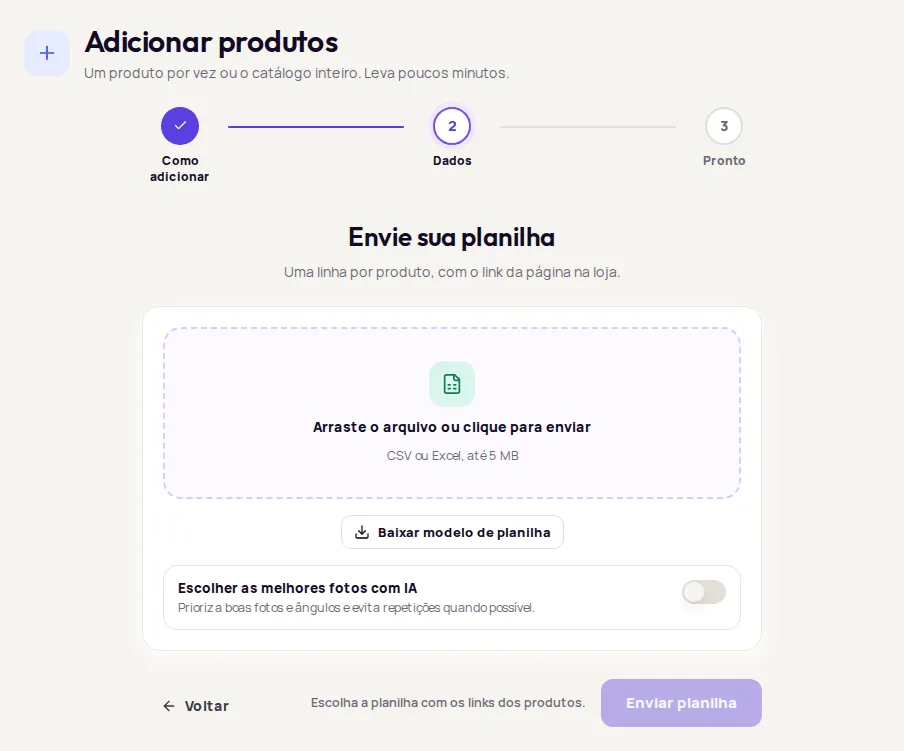
After you upload, follow the progress in Importações recentes (Recent imports), on the same Adicionar produtos screen. The statuses and actions are the same as in an import by link.
Common errors
Section titled “Common errors”| Message | What to do |
|---|---|
| Envie um arquivo CSV ou Excel (.xlsx). (Upload a CSV or Excel (.xlsx) file.) | Save the spreadsheet as .csv or .xlsx. |
| O arquivo está vazio. (The file is empty.) | Make sure you saved the links before uploading. |
| O arquivo passa de 5 MB. Divida em arquivos menores. (The file is over 5 MB. Split it into smaller files.) | Spread the links across more than one spreadsheet. |
| Nenhuma coluna com URLs foi encontrada no arquivo. (No column with URLs was found in the file.) | Put the header url in the first row of the links column. |
| Nenhuma URL válida foi encontrada no arquivo. (No valid URL was found in the file.) | Check that the links are complete and start with https://. |
| Para importar por link ou planilha, sua loja precisa de uma chave de acesso. (To import by link or spreadsheet, your store needs an access key.) | Click Ir para Desenvolvedor (Go to Developer) and create a key. |
If the import finishes with failures, open Ver o que falhou (See what failed) in Importações recentes. See Import failed.
Frequently asked questions
Do I need to fill in the name, price and photos in the spreadsheet?
No. The spreadsheet only needs the product page links. Provei pulls the name, price and photos from each page.
What's the maximum file size?
5 MB. If your file is bigger, split it into smaller files.
Is there a spreadsheet template?
Yes. On the Envie sua planilha (Upload your spreadsheet) screen, click Baixar modelo de planilha (Download spreadsheet template).