Video Commerce: video results
In Video Commerce › Resultados (Results) you see how many customers saw your showcases, pressed play, clicked the products and added to the cart, per video and per showcase. Results show up after you publish and customers start watching.
Choose the period
Section titled “Choose the period”At the top of the screen, choose 7 dias (7 days), 30 dias (30 days) or 90 dias (90 days). Days follow São Paulo time (Brasília), and today is included in the period.
To take the numbers to a spreadsheet, click Exportar CSV (Export CSV). The file has one row per video and per showcase.
From video to cart
Section titled “From video to cart”The Do vídeo ao carrinho (From video to cart) funnel shows each step and the drop between them:
| Step | What it counts |
|---|---|
| Exibições (Views) | How many times a showcase was shown to a customer. |
| Reproduções (Plays) | How many times a customer pressed play on a video. |
| Cliques em produto (Product clicks) | How many times a customer tapped a product in the video. |
| Adicionados ao carrinho (Added to cart) | Products added to the cart from the player, confirmed by your store. |
| Receita (Revenue) | Comes from Google Analytics. See below. |
Between steps, the arrow shows how many moved on to the next one. Sometimes a step has more than the one before, for example when a customer reopens the player or adds to cart without tapping the product. In that case, the arrow shows without a percentage, and the count of each step is what matters.
Below the funnel, the screen points out the biggest drop and what usually helps, such as keeping Prévia silenciosa (Silent preview) on or tagging more products in each video. See the best practices.
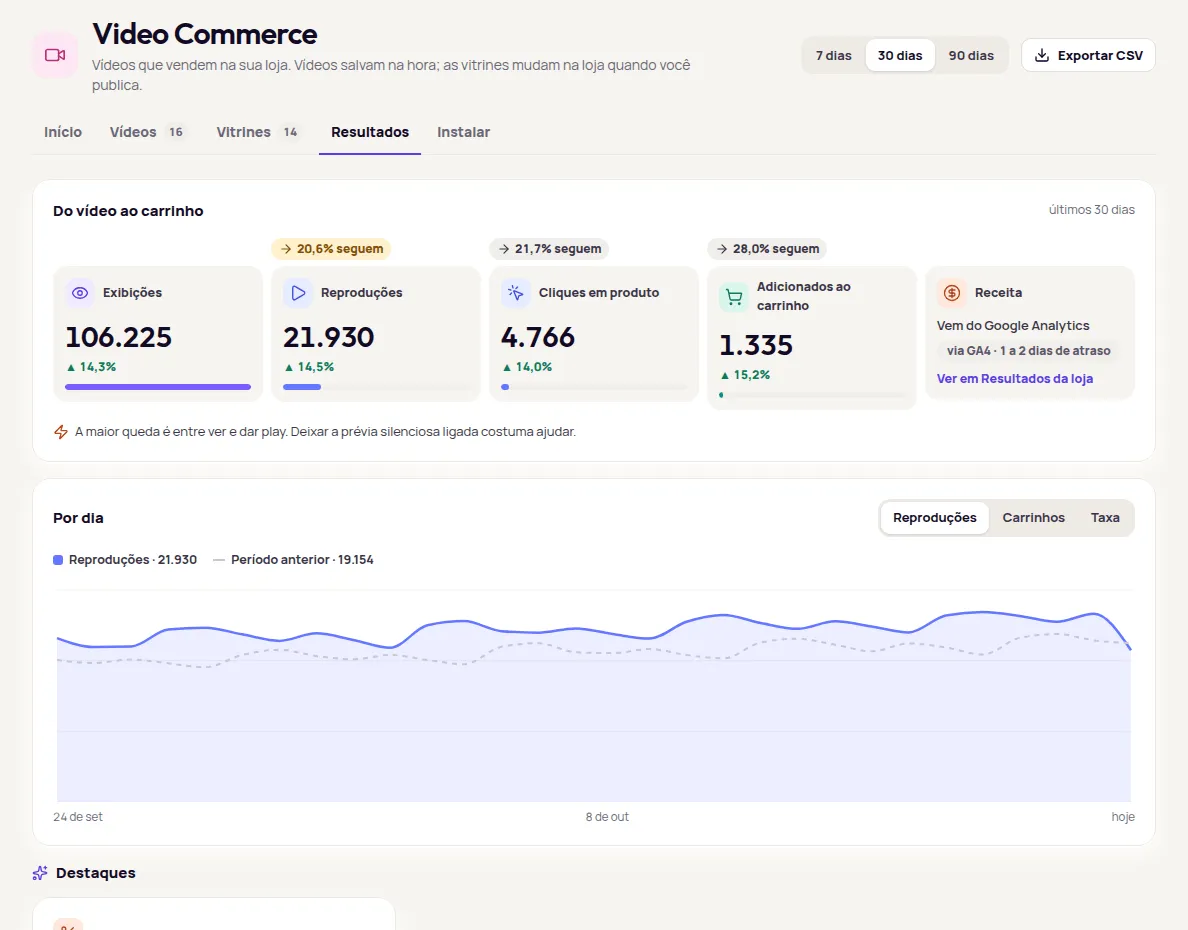
Example account; the numbers are illustrative.
Revenue
Section titled “Revenue”Revenue comes from Google Analytics 4, with a 1 to 2 day delay. To see the amount, click Ver em Resultados da loja (See in store Results). Without Google Analytics connected, revenue doesn’t show. See Revenue from try-on users and Google Analytics.
By day
Section titled “By day”The Por dia (By day) chart shows Reproduções (Plays), Carrinhos (Carts) or Taxa (Rate) day by day. For the 7 and 30 day periods, it compares with the previous period.
Highlights
Section titled “Highlights”Destaques (Highlights) spells out what’s worth a look, with a button to act on it:
- Melhor vídeo (Best video): the video that drives more carts than the average of your videos.
- Oportunidade (Opportunity): a video with a high cart rate that could go on more pages, with Colocar no carrossel (Add to carousel). Then publish for it to apply in your store.
- Atenção (Attention): a video with many plays and no product tagged, with Marcar produto (Tag product).
Videos that drive the most carts
Section titled “Videos that drive the most carts”The ranking lists videos by carts, with Reproduções (Plays), Taxa de carrinho (Cart rate) and Carrinhos (Carts). Videos with no product tagged show Sem produto (No product); deleted videos show Excluído (Deleted).
By showcase
Section titled “By showcase”Por vitrine (By showcase) shows the same numbers for each showcase. Use it to compare formats and pages, for example the bubble on product pages against the home page carousel.
Each video also has its own numbers for the last 30 days in its details, and each product shows its videos’ results in the Vídeos deste produto (This product’s videos) card. See Upload videos and Videos on products.
Monthly usage, in video views, is on the Uso do mês (Monthly usage) card on the Início (Home) screen. See Monthly usage.
Frequently asked questions
Do the numbers count purchases made later, on the product page?
Adicionados ao carrinho (Added to cart) counts only products added to the cart from the video player, confirmed by your store. Revenue comes from Google Analytics 4 and shows in your store's Resultados (Results).
Which time zone are the days counted in?
São Paulo time, the same as Brasília. Today is included in the period.
Why is Resultados empty?
Results show up after you publish a showcase and customers start watching. With little data, the screen shows Poucos dados ainda (Not much data yet).