Video Commerce appearance: publish
Where in the dashboard: Video Commerce › Aparência
In Aparência (Appearance), every change is saved on its own as a draft, with no save button. Your store only changes when you click Publicar (Publish). Until then, Descartar (Discard) undoes everything and takes the appearance back to what is published.
How to tell what’s left to publish
Section titled “How to tell what’s left to publish”Under the Aparência dos vídeos na loja title, the screen shows the draft’s state:
| Notice | What it means |
|---|---|
| Salvando rascunho… (Saving draft) | The change is being saved. |
| Rascunho salvo · publique para valer na loja (Draft saved · publish to apply it in your store) | There are changes your store doesn’t have yet. |
| Igual à loja (Same as the store) | The draft is the same as what is published. |
| Não salvo (Not saved) | The last change wasn’t saved. The notice at the top says what to fix. |
With changes to publish, the bar at the bottom of the screen shows how many there are, with Descartar and Publicar. The appearance counts as one change, together with the showcase changes.

Publish
Section titled “Publish”-
Check the draft in the Prévia ao vivo (Live preview), on phone and on computer.
-
Click Publicar in the bar at the bottom of the screen. The button shows Publicando… (Publishing).
-
Wait for the Publicado. Pode levar 1 minuto para aparecer na loja. (Published. It can take 1 minute to show in your store.) notice.
-
Open your store, ideally in a private window, and check the showcases and the player.
Publicar takes the appearance and the showcase changes together. If the appearance can’t be saved first, nothing is published and the dashboard warns: “A aparência não foi salva, então nada foi publicado” (The appearance wasn’t saved, so nothing was published). Fix the notice in Aparência and publish again.
Contrast warnings don’t stop you from publishing. See Contrast warnings.
Discard
Section titled “Discard”-
Click Descartar in the bar at the bottom of the screen.
-
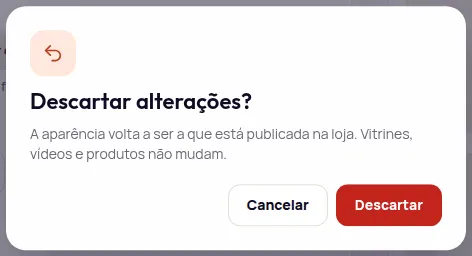
The dashboard asks Descartar alterações? (Discard changes?) and explains what goes back. With changes only in the appearance: “A aparência volta a ser a que está publicada na loja. Vitrines, vídeos e produtos não mudam.” (The appearance goes back to what is published in your store. Showcases, videos and products don’t change.)
-
Click Descartar to confirm, or Cancelar (Cancel).
If you also changed showcases during this visit, those changes are lost too. Videos and products never change, because they were already saved.
Discard or Restore?
Section titled “Discard or Restore?”- Descartar goes back to what is published in your store.
- Restaurar padrão, Restaurar grupo and Restaurar tudo (Restore default, group, everything) go back to the Provei default, in the draft only. Then publish for your store to change.
Changed in another tab
Section titled “Changed in another tab”If the appearance changes in another tab or by another person while you edit, the dashboard doesn’t save over it. It warns: “A aparência mudou em outra aba ou com outra pessoa. Suas mudanças desta tela ainda não foram salvas. Qual versão fica?” (The appearance changed in another tab or by another person. Your changes on this screen aren’t saved yet. Which version stays?)
- Manter a minha (Keep mine): your version stays.
- Usar a outra (Use the other one): the version saved in the other tab stays, and your changes on this screen are lost.
After a plan change
Section titled “After a plan change”If your store’s plan changes, the bar may show a change to publish even if you didn’t touch anything. That’s because the Enterprise settings start or stop applying in your store. When you leave Enterprise, they disappear from your store on their own and stay saved in the dashboard. See If your store leaves Enterprise.
Frequently asked questions
Do I need to click save in Aparência?
No. Each change is saved on its own as a draft. For your store to change, click Publicar (Publish).
How long does the new appearance take to show in my store?
Up to 1 minute after Publicar. Reload the store page, ideally in a private window.
Does Descartar delete my showcases?
No. Descartar (Discard) takes the appearance back to what is published in your store and undoes this visit's unpublished showcase changes. Videos and products don't change.