What is video commerce? A guide for fashion stores
Video commerce means selling with shoppable videos in your store: the three meanings of the term, the five formats, what to ask of a tool and how to measure.
In this article
This article is divided into sections. Browse the topics below to find the information you need.
Video commerce means selling with videos that lead straight to the purchase. Shoppers watch the garment in motion inside your own store, see the price and, with the more complete tools, pick a size and add to cart without leaving the video. In fashion, video shows what a photo hides: drape, fabric and movement. Provei.AI’s Video Commerce does this with the videos a brand already posts on Instagram and TikTok.
Video commerce: three different things under one name
Before choosing a tool, it helps to know which video commerce you mean. We checked the first page of Google Brazil for “video commerce” on November 11, 2026. The results use the term in three senses: shoppable videos inside the store, live-stream selling (live commerce) and even video calls between a sales rep and a buyer in B2B wholesale.
These are different investments, with different teams and metrics. The table separates the three and adds social commerce, which usually comes up in the same conversation.
| Model | How it works | Where the purchase happens | What it asks of the team |
|---|---|---|---|
| Shoppable video | Short recorded videos with the products tagged. Shoppers watch whenever they want. | On the store website, in the store’s own cart | A library of short videos, which many brands already have on social media |
| Live commerce | A live broadcast with a host, offers and featured products. | On the live platform or the website | Script, presenter, a fixed time slot and promotion for every live |
| Sales video calls (B2B) | A rep serves the retailer or buyer over video, with the catalog open. | In the rep’s order | Reps available in real time |
| Social commerce | Selling inside the social network, such as an Instagram shop or TikTok Shop. | In the social network’s checkout | A catalog integrated with the network and operations there |
This guide covers the first row: the shoppable video in your store. It is the model that works without a broadcast schedule and keeps the sale, the data and the cart on your website.
Why fashion is the strongest case
A catalog photo shows the garment standing still, from the front, in the best light. The doubt of someone buying clothes online is almost always in what the photo does not show: how the fabric falls, how much a skirt opens when walking, whether trousers cling, what the real length is on the body. A short video answers much of that.
Fashion brands usually have this material ready, too. According to NuvemCommerce 2026, as cited by Nuvemshop, direct selling on social media was the main acquisition strategy for 60% of fashion merchants in 2025. Whoever sells through social media already records Reels and TikToks. Video commerce brings those videos to the page where the shopper decides and where the checkout is yours.
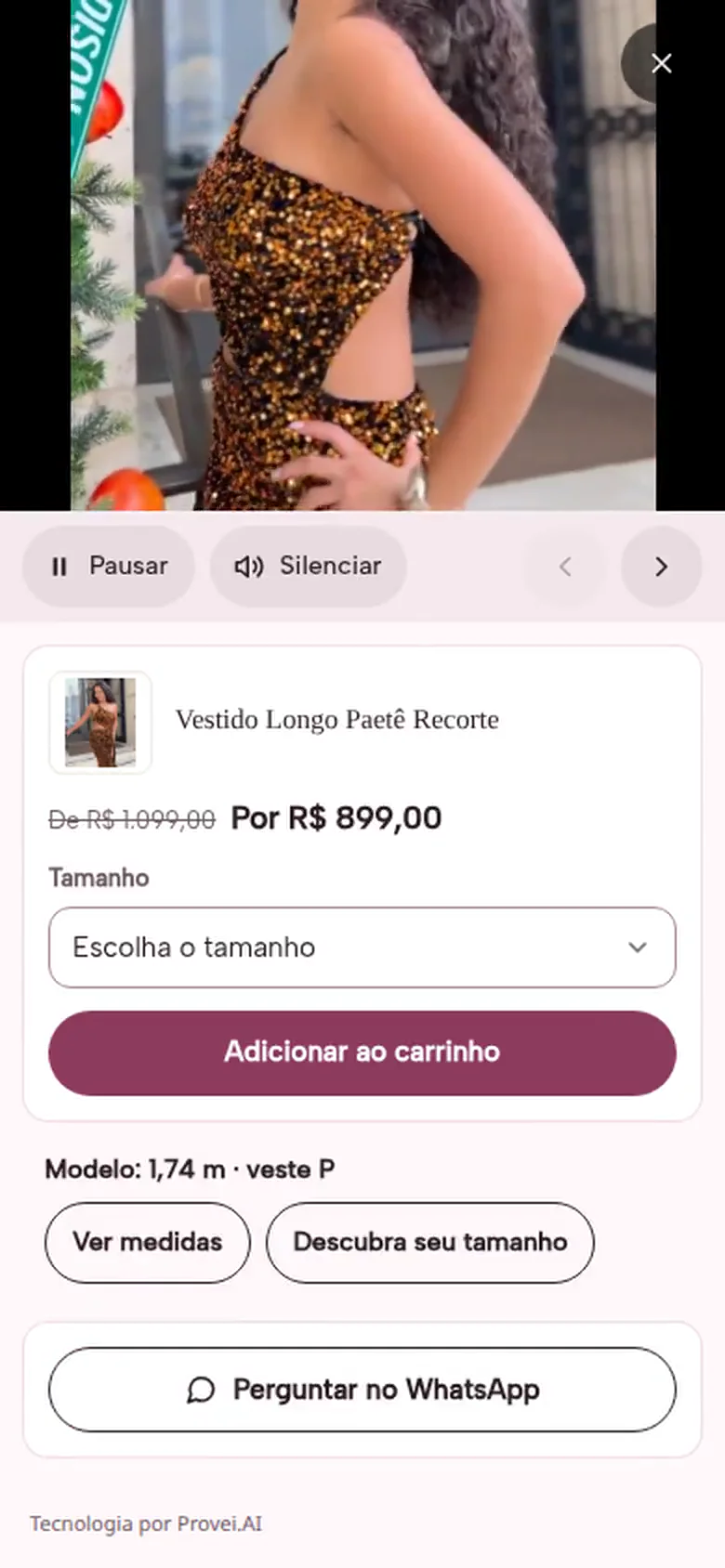
The player on Provei’s demo store, a fictional fashion store (interface in Portuguese): store price, size, cart and the measurements of the person in the video.
The detail that helps most with size
Showing who is in the video, as in “Model: 1.74 m, wears S”, gives shoppers a concrete reference to compare with their own body. In Provei’s Video Commerce, the merchant registers these measurements (only with the person’s permission) and, if the store uses the Size Chart, the player opens size recommendation right there.
One limit needs to be clear: the video shows the garment on someone else’s body. For shoppers to see the clothes on themselves, the tool is a virtual try-on; to get the size right, size recommendation. Each one answers a different doubt.
The five formats and where each fits in the purchase
A showcase is the block of videos that appears on the store, with a format and a place. One store can have several. The names below are those of Provei’s Video Commerce, but the formats repeat across tools on the market.
| Format | Where it works best | Shopper moment | What it is for |
|---|---|---|---|
| Product spotlight | Product page, below the photos or the buy button | Deciding | Showing the garment on the body close to the decision |
| Floating bubble | Product page, in a corner of the screen | Deciding | Keeping the video at hand without taking up space |
| Stories | Home page and categories, below the banner | Discovering | A gesture shoppers already know from social media |
| Carousel | Home page and categories | Discovering | Presenting new arrivals and collections in motion |
| Grid | Collection page or a page just for videos | Exploring | Showing a whole collection, each video with its products |
If you start with just one, start with the product page. It is where the shopper has already picked the garment and only needs the doubt resolved. In Provei’s dashboard, “below the buy button” is the most used position, and a video tagged with a product appears on that product’s page without setting a position.
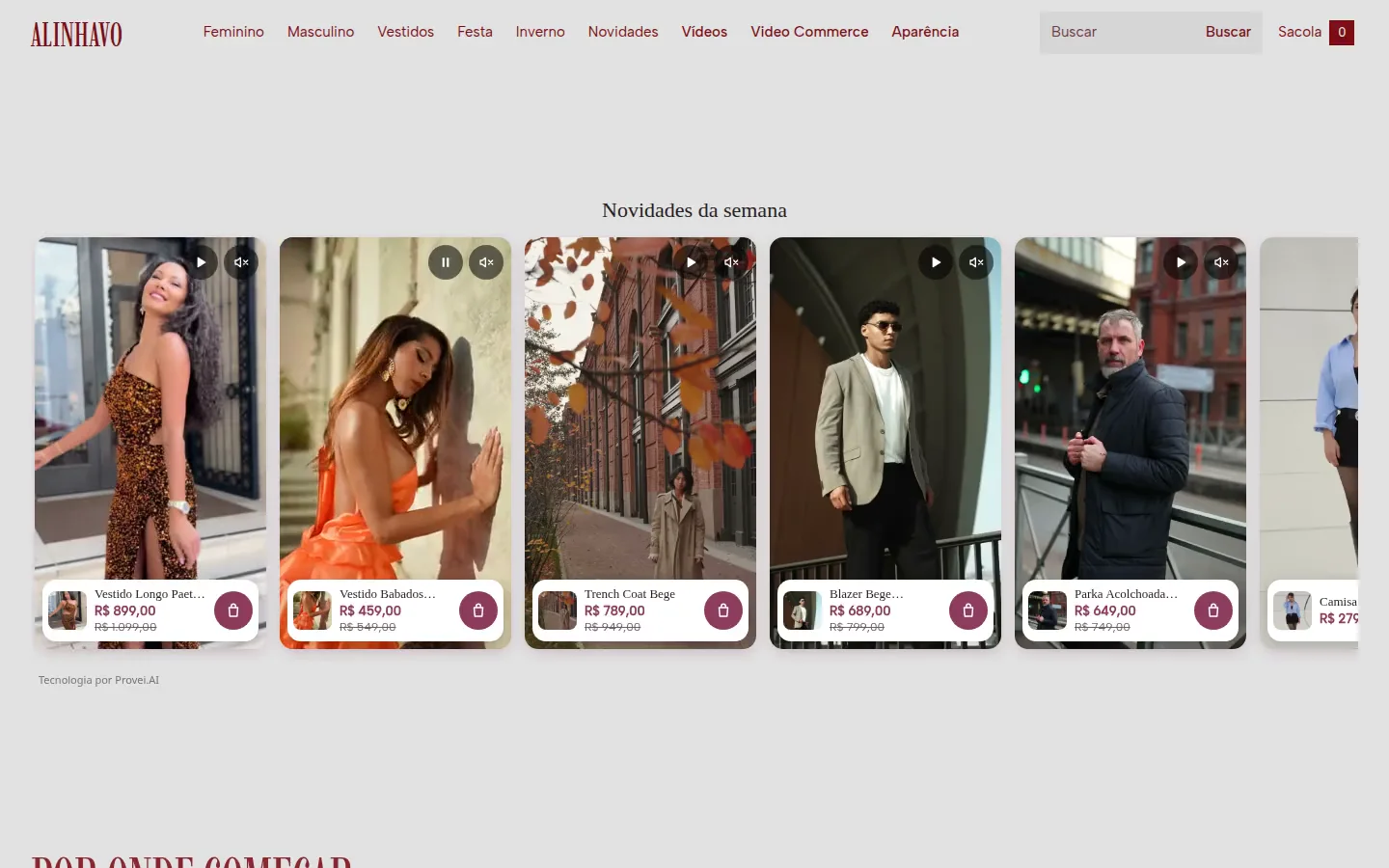
A carousel of shoppable cards on the demo store home page: the video plays in the card, with the price and the bag below.
What separates a shoppable video from a pretty video
Putting a video player on the store is easy. Making the video sell depends on details that only show up in use. Use this list to evaluate any tool, ours included.
- Purchase inside the video: shoppers pick the size and add to the store’s own cart without leaving the player, and the confirmation only appears after the cart has accepted it.
- The store price, not a copied price: the player shows the current value, with the old price struck through and instalments when the platform provides them, and follows the chosen variant.
- Works beyond the product page: buying from the home page, categories and a videos page, in addition to the product page.
- Import from social media: bringing in Instagram and TikTok videos without downloading and uploading file by file, ideally with AI tagging the products.
- Automatic video on the product: a video tagged with a garment appears on its page with no extra setup.
- No new code: installation that needs no developer, and a preview before publishing.
- Measurement down to the cart: a funnel per video (impressions, plays, clicks, cart) and revenue from your Google Analytics 4.
- Predictable billing: understand whether the price rises per view, per video or per credit, and what happens when the limit is reached.
In Provei’s Video Commerce, the first seven items exist, with a caveat that applies to any tool: purchasing inside the player depends on the store’s platform. The list of compatible platforms shows what works on each one. Usage is counted in video views, not AI credits; the amounts are on the pricing page.
If you are already comparing vendors, the comparison of Provei.AI, Widde and Replay puts the three side by side, with dated sources.
How to measure video commerce without fooling yourself
The most common mistake is comparing those who clicked the video with those who did not and calling the difference the video’s result. Whoever taps a product video was already more interested in the garment. Part of the difference comes from the video, part from who chose to watch.
How many times the showcase appeared on screen. At Provei, it counts when at least half of it is visible.
How many times shoppers pressed play. High impressions with few plays call for a better cover or position.
Taps on the products in the video. Shows whether the video presents the right garment.
Products that went to the cart from the player. This is the metric that tells you which videos sell.
Comes from the connected Google Analytics 4. At Provei, it arrives with a 1 to 2 day delay.
To isolate the effect, compare similar groups: the same categories before and after turning video on, or half of the product pages with a showcase and half without, over the same period. Rank videos by add-to-cart rate, not by plays. A heavily watched video that takes no one to the cart is entertainment.
Correlation is not cause
The sales report in Provei’s Video Commerce compares revenue, orders, conversion and average order value for those who used the videos, those who saw them and did not use them, and those who did not see them. It shows a relationship, not the cause. Use that number to choose videos and positions, and the group test to decide the investment.
A case: Approve on Black Friday
Approve, a streetwear brand, brought more than 200 influencer videos into its website with Provei’s Video Commerce. The results of the first week of Black Friday:
of impact in the first week of Black Friday, 15% of revenue
conversion among those who interact
retention
ROI
These figures are from Video Commerce on Black Friday and are separate from the 35-day virtual try-on period described in the full Approve case study.
How to start with the videos you already have
A short plan for the first showcase, without recording anything new:
The best sellers or the ones that raise the most doubts about fit and size. They concentrate product page traffic.
Connect the Instagram or TikTok profile and import the Reels of those garments. At Provei, AI tags the products and you accept or reject the suggestions.
Product spotlight or bubble, below the buy button. Register the model’s measurements once you have permission.
Stories or a carousel with new arrivals. Check the preview on a phone before publishing.
Replace videos with high plays and low cart adds, and record more of the kind that leads to the cart.
At Provei, Video Commerce is activated by the team, and a store that already has the Provei code does not need to install anything new. To see the formats working before deciding, open the demo store on your phone. The detailed walkthrough is in the Help Center.
How this guide was made
Written by the Provei.AI team, with AI assistance in research and drafting. The capabilities mentioned come from the Video Commerce page and Provei’s Help Center; the screens are from the demo store, a fictional fashion store. Provei sells a video commerce tool: the criteria list in section 4 was written to work for any vendor, and the comparison cited lists the sources for each competitor.
Sources checked on 11/11/2026: first page of Google Brazil for “video commerce” (desktop, Portuguese); Nuvemshop, “Marketing para loja de roupas” (in Portuguese), which cites NuvemCommerce 2026; the Approve case as in the published case study.
See your videos selling inside your store
Explore the five formats, the Instagram and TikTok import and the cart inside the player.