From size charts to comparison: a clearer sizing decision
Present measurements, recommend a size, and help customers compare alternatives with confidence.
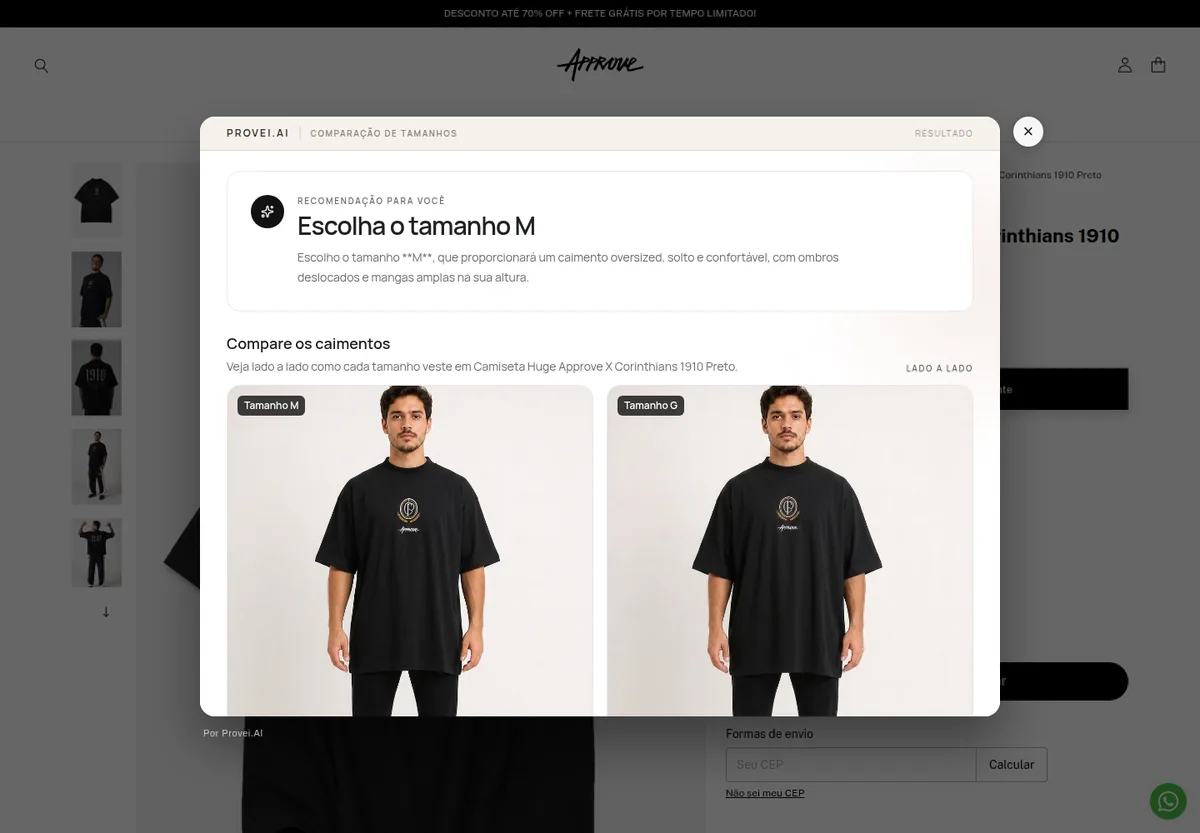
Live Provei.AI experience at Approve.
What it solves
A clear benefit at every purchase decision.
The chart explains measurements. The recommender suggests an option. The comparator makes the difference between the recommended size and an alternative easier to understand visually.
How it works
From context to the next step.
-
Structure the grid
The store adds or connects the relevant measurements for each product.
-
Collect what matters
The experience asks only for the data defined for the recommendation.
-
Explain the choice
Customers receive a recommendation and can explore it with visual comparison.
Best fit
Who this experience is for
- Brands with proprietary size grids
- Multi-brand operations
- Categories with frequent fit questions
Plan your experience
Start with what your store needs
During the demonstration, we define the categories, required data, integration, experience limits, and review steps.
Talk to a specialistFrequently asked questions
What you need to know.
Are a chart, recommendation, and comparison the same thing?
No. The chart provides measurements; the recommendation turns data into a suggestion; the comparison shows two options side by side. They can work together, but they solve different moments in the decision.
Does the comparator replace the recommended size?
No. The recommended size is a natural anchor. Comparison helps customers evaluate a closer or looser alternative without erasing the original recommendation.
Keep exploring
Products that work together
Size Chart
Present the product size chart in a structured way and connect the chart to Provei.AI’s other sizing experiences.
View productSize Recommendation
Combine the data requested by the brand with the configured fit to suggest the most compatible size.
View productSize Comparison
Use the recommended size as a natural anchor and compare a closer or looser option visually.
View productGuided demonstration
See Sizing in the context of your operation.
Tell us what your store sells and see how this experience can support your customers.